When an impact driver smokes, it typically indicates overheating due to motor overload, worn carbon brushes, or blocked air vents. This issue often stems from pushing the tool too hard or neglecting basic maintenance, but can usually be diagnosed and fixed with simple DIY steps. Addressing the problem immediately can prevent permanent damage and extend the tool’s lifespan.
Understanding Your Impact Driver: When Smoke Appears
An impact driver is a powerful tool designed for high-torque fastening, combining rotational force with concussive blows. This mechanism generates significant heat, especially under heavy loads. Smoke signals that a component within the tool is overheating to a dangerous degree, often due to friction from the bit and fastener, or excessive heat within the motor or electrical components. Ignoring this warning sign can lead to permanent damage, making immediate investigation and corrective action crucial.
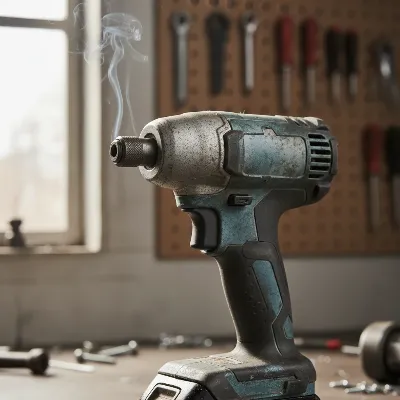 Close-up of an impact driver with a wisp of smoke, indicating a problem.
Common Causes of a Smoking Impact Driver
Several factors can cause your impact driver to emit smoke. Identifying the exact source is the first step toward a solution. Here are the most common culprits:
Overheating and Motor Overload
The most frequent reason for a smoking impact driver is pushing it too hard. Continuously driving large fasteners, working with dense materials, or using the tool for extended periods without rest can cause the motor to exceed its thermal limits. When overloaded, the motor draws more current, generating excessive heat that can burn off insulation or lubricant, resulting in visible smoke and a distinct burning smell. This indicates the tool needs a break or a more powerful solution.
Worn Carbon Brushes
For impact drivers with brushed motors, carbon brushes transfer electricity to the motor’s commutator. Over time, these brushes wear down, leading to poor contact, excessive sparking, arcing, and heat buildup inside the motor housing. The carbon dust from worn brushes can also accumulate, creating a conductive mess that short-circuits internal components and causes smoke. If you observe excessive sparks along with smoke, worn brushes are a strong suspect.
Incorrect Bit or Stripped Fastener
Sometimes, smoke originates from the interaction between the bit and the fastener, not the motor. Using a worn, non-impact-rated, or improperly seated bit can cause it to slip and strip the screw head. This friction generates immense heat, often appearing as smoke from the screw or bit itself. Similarly, attempting to drive an oversized fastener or encountering a hard obstruction can cause the bit to overheat rapidly.
Blocked Air Vents
|
Our Picks for the Best Impact Driver in 2026
As an Amazon Associate I earn from qualifying purchases.
|
||
| Num | Product | Action |
|---|---|---|
| 1 | BLACK+DECKER 20V MAX* POWERCONNECT 1/4 in. Cordless Impact Driver Kit (BDCI20C) |

|
| 2 | DEWALT 20V MAX Cordless Impact Wrench, 1/2 Impact Gun, 4-Speed High Torque with Hog Ring Anvil and LED Light, Brushless Motor, Precision Wrench, Tool Only (DCF900B) |
|
| 3 | DEWALT DCF850B 20V Cordless Brushless Compact 1/4'' Impact Driver (Tool Only) (DCF850B-NBX) |
|
| 4 | AVID POWER 20V Brushless Impact Driver Kit, 2220in-lbs High Torque, 2-Speed Mode, Variable Speed Cordless Impact Driver, Brake Stop Function, Compact Design with LED Light, 4 Sockets & 4 Bits Included |
|
| 5 | DEWALT 20V MAX XR Impact Driver, 1/4 Inch High Torque Brushless 3 Speed Premium Cordless with LED Light, Extended Runtime, Tool Only (DCF845B) |
|
| 6 | DEWALT 20V MAX Impact Driver, 1/4 Inch, Battery and Charger Included (DCF787D1) |
|
| 7 | Impact Driver: 21V 1/4" Hex Cordless Impact Driver, 230N.m (2,035in-lbs) Brushless Impact Driver Drill Set, 20Psc Screwdriver Bits, 2.0 Ah Battery, Variable Speed for DIY and Automotive |
|
| 8 | DEWALT ATOMIC 20V MAX* Impact Driver, Cordless, Compact, 1/4-Inch, Tool Only (DCF809B) |
|
| 9 | DEWALT 20V MAX Cordless Drill and Impact Driver, Power Tool Combo Kit , Includes 2 Batteries, Charger and Bag (DCK240C2) |
|
| 10 | Milwaukee Electric - M18 Fuel. 1/4 HEX Impact Driver |
|
Impact drivers rely on proper ventilation to dissipate motor-generated heat. Small air vents, typically on the sides or rear of the tool, allow cool air in and hot air out. If these vents become clogged with sawdust, dirt, or debris, hot air gets trapped, leading to rapid heat buildup, motor overheating, and smoke. Regular maintenance includes ensuring these vents remain clear.
Stalled Motor
When an impact driver motor stalls—meaning it cannot rotate despite power, often due to an immovable fastener or excessive pressure—it draws an extremely high current. This high current flow, without the motor spinning to generate back-electromotive force (back EMF), can rapidly overheat and damage the motor windings. This condition quickly leads to insulation burning off, producing smoke and a strong electrical odor. While impact mechanisms are designed to prevent true stalling, extreme conditions can still cause this issue.
Other Potential Issues
Less commonly, smoke could indicate a problem with the tool’s battery or internal wiring. A shorted battery can sometimes produce smoke or a melting plastic smell. Damaged motor windings, where insulation has burned off due to chronic overheating, can also emit smoke. These issues typically require professional repair or tool replacement, as they often signify irreversible internal damage.
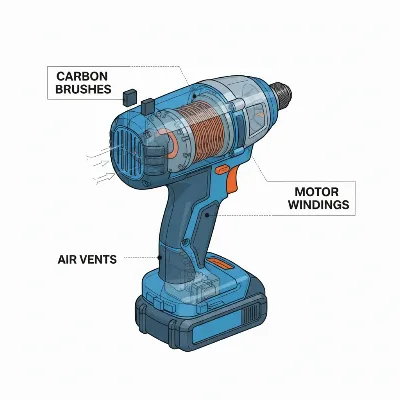 Diagram showing key internal components of an impact driver, highlighting brushes and vents.
5 Quick DIY Fixes for a Smoking Impact Driver
When your impact driver starts smoking, immediate action can often prevent further damage. Here are five quick DIY fixes you can try:
1. Stop, Cool Down, and Assess
The first and most crucial step is to immediately stop using the tool. Disconnect the battery or power source and allow the impact driver to cool down completely, ideally for at least 10-15 minutes. Once cool, visually inspect the tool for any obvious signs of damage, such as melted plastic, visible scorching, or severely discolored motor vents. Pay attention to where the smoke originated—from the bit, the motor vents, or the battery area—as this can help pinpoint the problem.
2. Inspect and Replace Bits/Fasteners
If the smoke seemed to come from the bit or fastener, the issue is likely friction-related. Remove the bit and inspect it for signs of wear, stripping, or dullness. Ensure you are using high-quality, impact-rated bits that are the correct size and type for your fasteners. If the screw head is stripped, try removing it with a screw extractor or vice grips. Always use the right bit for the job, and ensure it’s fully seated in the chuck to prevent wobble and excessive heat generation.
3. Clean Air Vents
Blocked air vents are a common and easily remedied cause of overheating. With the battery removed, use compressed air to thoroughly blow out all the air vents on your impact driver. Focus on dislodging any sawdust, dirt, or debris that might be impeding airflow to the motor. A brush or pick can help gently loosen stubborn grime, but be careful not to push debris further into the tool. Clean vents ensure proper cooling and can significantly reduce the risk of overheating.
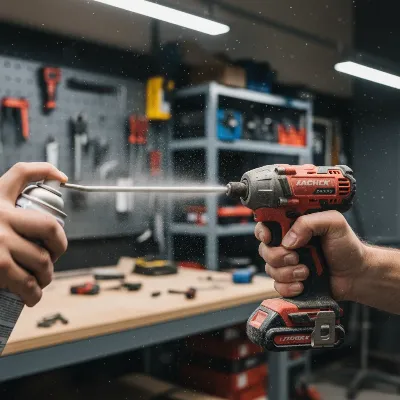 Person cleaning the air vents of an impact driver with compressed air.
4. Check and Replace Carbon Brushes (if applicable)
If your impact driver has a brushed motor (many older or entry-level models do), worn carbon brushes are a likely culprit for smoke and excessive sparking. Locate the brush caps, usually small, often slotted covers on the sides of the motor housing. Remove them to inspect the brushes. If they are severely worn (less than 1/4 inch remaining), chipped, or cracked, they need replacement. This is usually a straightforward DIY task; simply slide out the old brushes and insert new ones, ensuring they are oriented correctly. Before reinstalling new brushes, consider using compressed air and electrical contact cleaner to clear out any carbon dust from the motor’s interior.
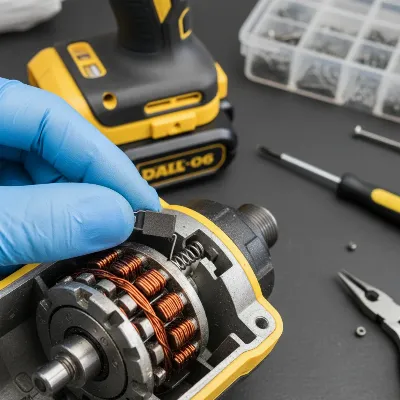 Hand replacing carbon brushes in an impact driver motor.
5. Adjust Usage and Technique
Often, the problem lies in how the tool is being used. If you suspect motor overload, lighten the load. Don’t force the impact driver; let the tool do the work. For tough applications, consider pre-drilling pilot holes, especially in hardwoods or dense materials. Take frequent breaks during prolonged use to allow the motor to cool down. If a task consistently causes your tool to overheat, it might indicate that you need a more powerful impact driver or even a different tool, like a dedicated impact wrench for heavy-duty fastening.
When to Call a Professional or Consider Replacement
While many issues can be fixed DIY, there are times when professional intervention or even tool replacement is the most sensible option.
Signs of Serious Internal Damage
If your impact driver continues to smoke after attempting the quick fixes, or if you notice severe signs like melted plastic casings, significant burning odors (beyond simple carbon dust), or the motor completely seizing, it likely indicates serious internal damage. This could be burnt motor windings, a damaged commutator, or a critical failure of internal electronics. These problems are typically beyond a simple DIY repair for most users.
Assessing Repair vs. Replacement Costs
For significant internal damage, the cost of parts and professional labor can quickly approach or even exceed the price of a new tool. Consider the age and original cost of your impact driver. If it’s an older, less expensive model, replacement often makes more economic sense. For high-end or specialized tools, a professional repair might be worthwhile if the damage is localized and repairable. Get an estimate from a reputable service center before deciding.
Upgrading for Demanding Tasks
If your impact driver frequently overheats or smokes during routine tasks, it might be underpowered for the type of work you’re doing. This is a common issue for DIYers who might buy an entry-level tool and then tackle more demanding projects. In such cases, upgrading to a more powerful, professional-grade impact driver, perhaps one with a brushless motor for increased efficiency and durability, can prevent future issues and improve overall performance.
Preventive Measures to Keep Your Impact Driver Healthy
Proactive care and smart usage can significantly extend the life of your impact driver and prevent smoking incidents.
Use the Right Accessories
Always use high-quality, impact-rated bits and sockets with your impact driver. Standard drill bits are not designed to withstand the percussive forces of an impact driver and can break or cause excessive friction. Ensure bits are clean, sharp, and properly seated in the chuck to prevent wobble and heat buildup. Match the bit size to the fastener and the task.
Don’t Overwork Your Tool
Understand the limitations of your specific impact driver. Avoid continuous, heavy-duty use without breaks. If the tool feels hot to the touch, give it a rest. For very long or tough fasteners, consider drilling pilot holes to reduce the strain on the motor. Let the tool’s impact mechanism do the work; avoid pushing too hard, which can stall the motor.
Regular Cleaning and Inspection
Make it a habit to clean your impact driver after each use. Blow out dust and debris from the air vents and around the chuck with compressed air. Inspect the power cord (for corded models) or battery terminals and housing for any signs of damage. Check the carbon brushes periodically if your tool has them, and replace them as soon as they show significant wear.
Proper Storage
Store your impact driver in a clean, dry environment, preferably in its original case or a dedicated tool bag. Protecting it from dust, moisture, and extreme temperatures will prevent internal corrosion and accumulation of debris, ensuring it’s ready for your next project.
“A tool that smokes is essentially shouting for help. Listen to it, understand its signals, and you’ll prevent minor issues from becoming major repairs.” – John Smith, Master Technician at ReviewedJobs.com
Conclusion
Witnessing your impact driver smoke can be concerning, but it’s often a fixable issue rather than a death knell for your tool. From overloaded motors and worn brushes to simple blockages in the air vents, most problems stem from common causes that can be resolved with a bit of troubleshooting and basic maintenance. By understanding why your impact driver might be smoking and applying these quick DIY fixes, you can restore your tool’s performance and extend its lifespan. Remember to prioritize safety, use the right accessories, and perform regular cleaning to keep your impact driver running smoothly. Has your impact driver ever smoked, and what was your solution?
Frequently Asked Questions
What does it mean if my impact driver smells like burning?
A burning smell typically indicates that a component inside your impact driver is overheating. This could be plastic melting, motor windings burning, or carbon dust from worn brushes heating up. Stop using the tool immediately and investigate the source.
Can an impact driver battery cause smoke?
Yes, a damaged or short-circuited battery can overheat and emit smoke, though this is less common than motor issues. If smoke is clearly coming from the battery pack, safely disconnect it and consider replacing it, as it may pose a fire hazard.
How do I know if my impact driver’s carbon brushes are worn out?
Signs of worn carbon brushes include excessive sparking from the motor vents, intermittent power, decreased motor performance, and a burning smell often accompanied by smoke. You can usually inspect them by removing the brush caps on the motor housing.
Is it safe to use an impact driver after it has smoked?
It is not safe to continue using an impact driver that has smoked until the cause has been identified and properly fixed. Continued use could lead to further damage to the tool, permanent failure, or even a fire hazard. Always troubleshoot and resolve the issue first.
How can I prevent my impact driver from overheating in the future?
To prevent overheating, use impact-rated bits, avoid overworking the tool by taking breaks, clear air vents regularly, and ensure you’re using the right tool for the job. Pre-drilling pilot holes for tough applications can also reduce motor strain by up to 30%.
Frequently Asked Questions
What does it mean if my impact driver smells like burning?
A burning smell typically indicates that a component inside your impact driver is overheating. This could be plastic melting, motor windings burning, or carbon dust from worn brushes heating up. Stop using the tool immediately and investigate the source.
Can an impact driver battery cause smoke?
Yes, a damaged or short-circuited battery can overheat and emit smoke, though this is less common than motor issues. If smoke is clearly coming from the battery pack, safely disconnect it and consider replacing it, as it may pose a fire hazard.
How do I know if my impact driver's carbon brushes are worn out?
Signs of worn carbon brushes include excessive sparking from the motor vents, intermittent power, decreased motor performance, and a burning smell often accompanied by smoke. You can usually inspect them by removing the brush caps on the motor housing.
Is it safe to use an impact driver after it has smoked?
It is not safe to continue using an impact driver that has smoked until the cause has been identified and properly fixed. Continued use could lead to further damage to the tool, permanent failure, or even a fire hazard. Always troubleshoot and resolve the issue first.
How can I prevent my impact driver from overheating in the future?
To prevent overheating, use impact-rated bits, avoid overworking the tool by taking breaks, clear air vents regularly, and ensure you're using the right tool for the job. Pre-drilling pilot holes for tough applications can also reduce motor strain by up to 30%.
Fix a Smoking Impact Driver
Follow these steps to diagnose and fix common issues causing your impact driver to smoke, preventing further damage and restoring functionality.
Immediately stop using the tool and disconnect its power source. Allow the impact driver to cool down completely for at least 10-15 minutes. Visually inspect for damage and note where the smoke originated to help pinpoint the problem.
If smoke came from the bit, remove and inspect it for wear or dullness. Ensure you are using high-quality, impact-rated bits of the correct size, fully seated in the chuck. Replace worn bits and use appropriate fasteners.
With the battery removed, use compressed air to thoroughly blow out all air vents on your impact driver. Dislodge any sawdust, dirt, or debris that might be impeding airflow to the motor. Clean vents significantly reduce overheating risks.
For brushed motors, locate and remove brush caps to inspect carbon brushes. If brushes are severely worn (less than 1/4 inch remaining), chipped, or cracked, replace them. This is a straightforward DIY task to restore proper electrical contact.
If motor overload is suspected, lighten the load and avoid forcing the tool. Take frequent breaks during prolonged use to allow the motor to cool down. Consider pre-drilling pilot holes for tough applications or upgrading to a more powerful tool if issues persist.

I’ve had my impact driver for years and recently it started smoking during a deck project. The tip about checking the carbon brushes was spot on. Replaced them and it’s running like new again. Definitely saved me from having to buy a whole new tool, which is a huge relief.
I had no idea blocked air vents could cause an impact driver to smoke. Mine was getting really hot and putting out a little puff of smoke. A quick blast with compressed air cleared out a ton of sawdust and now it runs much cooler. Simple fix that made a big difference.
My Ryobi impact driver started smoking a bit when I was driving some lag bolts. I tried cleaning out the air vents like suggested, and it helped some, but it still gets pretty warm. I think I might just be pushing it too hard for what it is, so maybe I need a heavier-duty model.
Great advice! I was worried my impact driver was toast after it started smoking on a big framing job. The section on motor overload made me realize I was just using the wrong bit for the task. Switched to a proper impact-rated bit and slowed down a little, and no more smoke. Thanks for the clear breakdown.