Lubricating your impact driver’s anvil is essential for maintaining its performance and extending its lifespan. This process involves disassembling the tool’s head, thoroughly cleaning the anvil and hammer mechanism, applying a thin, even coat of specialized lithium-based grease, and then carefully reassembling and testing the tool. Regular lubrication prevents reduced power, increased heat, and premature tool failure, ensuring optimal operation for years.
What is an Impact Driver Anvil?
The anvil is a critical component located at the business end of your impact driver. It’s the shaft that holds the bit or socket and directly receives the powerful rotational impacts from the tool’s internal hammer mechanism. This continuous, high-force interaction between the hammer and the anvil generates the immense torque that makes impact drivers so effective at driving fasteners. The anvil acts as the direct point of power transfer from the tool’s motor and hammer system to your work piece. Without a properly functioning anvil, your impact driver cannot perform its primary task efficiently.
Why Lubricate Your Impact Driver Anvil?
Regular lubrication of your impact driver’s anvil is a fundamental aspect of tool maintenance that offers several critical benefits. Firstly, it improves performance by reducing friction between the anvil and the hammer mechanism, allowing for smoother energy transfer and consistent power delivery. Secondly, it significantly extends tool life by minimizing wear and tear on these high-stress components. Proper lubrication acts as a protective barrier, preventing metal-on-metal grinding that leads to premature failure. Lastly, it prevents overheating and corrosion, ensuring your tool runs cooler and is less susceptible to rust, especially when exposed to varying environmental conditions. A well-lubricated anvil translates directly to a more efficient, reliable, and durable impact driver.
Understanding Impact Driver Anvil Lubrication Needs
The lubrication needs of an impact driver’s anvil depend heavily on usage frequency and the specific design of your tool. For cordless impact drivers, which typically employ a grease-packed impact mechanism, monitoring performance signs is key. If your impact driver starts exhibiting reduced power, increased heat around the head, or unusual noises during operation, these are clear indicators that the anvil and hammer mechanism may be in need of fresh lubrication.
Generally, tools used frequently in demanding applications will require more regular lubrication than those used sporadically for light tasks. While some pneumatic impact wrenches might use an oil bath system for their impact mechanism, most modern cordless impact drivers rely on grease directly applied to the contact points of the anvil and hammer. Always consult your tool’s owner’s manual for manufacturer-recommended maintenance schedules and specific lubrication instructions. Ignoring these signs can lead to accelerated wear and potentially costly repairs down the line.
Choosing the Right Lubricant for Your Impact Driver Anvil
Selecting the correct lubricant is paramount for the health and performance of your impact driver’s anvil. For the hammer and anvil mechanism found in most cordless impact drivers, grease is the preferred choice over oil. You’ll want a high-quality, high-melting point lithium-based grease or a specialized impact tool grease. Many professionals recommend lubricants like Ingersoll Rand 105 or 170 grease, specifically formulated for impact mechanisms, though a good quality NLGI #2 bearing grease can also be suitable. These greases are designed to withstand the extreme pressures and temperatures generated during impact operation.
It’s crucial to avoid certain lubricants. Firstly, steer clear of greases containing molybdenum disulfide (moly grease), as the moly can be pressed out into sheets within the mechanism, potentially hindering performance rather than helping. Secondly, while air tool oil is essential for the motor of pneumatic tools, it is not suitable for the impact mechanism of a grease-lubricated impact driver. Lastly, general-purpose penetrants like WD-40 are not lubricants; they will thin out existing grease and offer no lasting protection against friction. Always prioritize the manufacturer’s recommendations found in your tool’s manual for the best results.
Essential Tools and Materials for Anvil Lubrication
Before you begin the lubrication process, gathering all the necessary tools and materials will ensure a smooth and safe experience. This preparation not only saves time but also prevents interruptions during critical steps.
Here’s what you’ll need:
- Your Impact Driver: The star of the show, ready for its maintenance.
- Appropriate Grease: High-quality lithium-based or specialized impact tool grease, as discussed in the previous section.
- Screwdrivers or Hex Keys: To open the impact driver’s housing. The specific type and size will vary by tool model, so have a set ready.
- Clean Cloths or Rags: Essential for wiping away old grease and cleaning components.
- Degreaser or Solvent (Optional but Recommended): For thorough cleaning of old, hardened grease and debris. Brake cleaner or a similar parts degreaser works well.
- Small Brush or Applicator: A small paintbrush, a cotton swab, or even your gloved finger for precise grease application.
- Safety Glasses: To protect your eyes from debris, old grease, or cleaning solvents.
- Gloves: To keep your hands clean and protect them from grease and solvents.
- Container for Old Grease: To dispose of spent lubricant responsibly.
- Camera (Optional): Taking pictures during disassembly can be incredibly helpful for reassembly, especially if you’re not familiar with the tool’s internal layout.
Having these items on hand will make the entire process more efficient and ensure you can complete the lubrication safely and correctly.
Step-by-Step Guide: How to Safely Lubricate Your Impact Driver Anvil DIY
Lubricating your impact driver’s anvil is a meticulous process that, when done correctly, will significantly enhance your tool’s performance and lifespan. Follow these steps carefully to ensure a safe and effective DIY maintenance session.
Safety First: Precautions Before You Start
|
Our Picks for the Best Impact Driver in 2026
As an Amazon Associate I earn from qualifying purchases.
|
||
| Num | Product | Action |
|---|---|---|
| 1 | Milwaukee Electric - M18 Fuel. 1/4 HEX Impact Driver |

|
| 2 | DEWALT 20V MAX Cordless Drill and Impact Driver, Power Tool Combo Kit , Includes 2 Batteries, Charger and Bag (DCK240C2) |
|
| 3 | DEWALT ATOMIC 20V MAX* Impact Driver, Cordless, Compact, 1/4-Inch, Tool Only (DCF809B) |
|
| 4 | BLACK+DECKER 20V MAX* POWERCONNECT 1/4 in. Cordless Impact Driver Kit (BDCI20C) |
|
| 5 | DEWALT DCF850B 20V Cordless Brushless Compact 1/4'' Impact Driver (Tool Only) (DCF850B-NBX) |
|
| 6 | DEWALT 20V MAX XR Impact Driver, 1/4 Inch High Torque Brushless 3 Speed Premium Cordless with LED Light, Extended Runtime, Tool Only (DCF845B) |
|
| 7 | AVID POWER 20V Brushless Impact Driver Kit, 2220in-lbs High Torque, 2-Speed Mode, Variable Speed Cordless Impact Driver, Brake Stop Function, Compact Design with LED Light, 4 Sockets & 4 Bits Included |
|
| 8 | Impact Driver: 21V 1/4" Hex Cordless Impact Driver, 230N.m (2,035in-lbs) Brushless Impact Driver Drill Set, 20Psc Screwdriver Bits, 2.0 Ah Battery, Variable Speed for DIY and Automotive |
|
| 9 | DEWALT 20V MAX Cordless Impact Wrench, 1/2 Impact Gun, 4-Speed High Torque with Hog Ring Anvil and LED Light, Brushless Motor, Precision Wrench, Tool Only (DCF900B) |
|
| 10 | DEWALT 20V MAX Impact Driver, 1/4 Inch, Battery and Charger Included (DCF787D1) |
|
Safety should always be your top priority. Before you touch any screws, ensure your impact driver is completely de-energized. For cordless models, remove the battery pack immediately. For pneumatic impact wrenches, disconnect the air hose. Always wear safety glasses to protect your eyes from any flying debris or grease, and gloves to keep your hands clean and protected from solvents and lubricants. Work in a well-lit and well-ventilated area, and keep children and pets away from your workspace.
Disassembly of the Impact Driver Head
This is where the precision begins. Using the appropriate screwdrivers or hex keys, carefully remove the screws that hold the tool’s head or housing together. Many impact drivers have a front cover that can be detached to reveal the impact mechanism. Pay close attention to the order in which you remove parts and consider taking photos with your phone as you go. This visual record can be invaluable during reassembly. Gently pry open the housing, being mindful of any wires or small springs that might be present. Your goal is to expose the anvil and the hammer mechanism components.
Cleaning the Anvil and Hammer Mechanism
With the internal components exposed, it’s time for thorough cleaning. Using a clean cloth and a degreaser or solvent, carefully wipe away all old, dirty, and hardened grease from the anvil, the hammer, and any other moving parts within the impact mechanism. Old grease can become thick and gritty, acting more like an abrasive than a lubricant. Ensure all debris, metal shavings, or dirt particles are meticulously removed. A small brush or cotton swab can help reach into tight spaces. This step is crucial, as fresh grease applied over old, contaminated grease won’t be as effective.
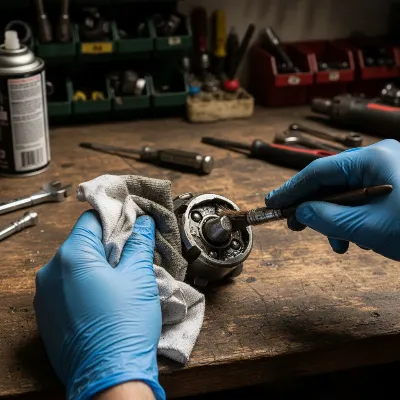 Cleaning an impact driver anvil and hammer mechanism to remove old grease
Applying the New Lubricant
Now for the lubrication. Take a small amount of your chosen impact driver grease and apply a thin, even coat to the critical contact points. These typically include the shaft of the anvil where the hammer strikes and rotates, the hammer faces themselves, and any bushings or bearings directly involved in the impact mechanism. The key here is “thin and even” – you want sufficient coverage to reduce friction, but do not overpack the mechanism with grease. Excessive grease can impede the hammer’s movement, collect debris, and lead to sluggish operation. Apply it carefully with a small brush, cotton swab, or your gloved finger, ensuring all friction surfaces are covered.
Reassembly and Testing
Once lubrication is complete, carefully begin reassembling your impact driver. Refer to any photos you took during disassembly to ensure all components, especially small springs or washers, are put back in their correct positions. Gently fit the housing halves together, making sure no wires are pinched. Tighten all screws securely, but avoid over-tightening, which can strip threads or crack plastic.
After reassembly, reinsert the battery (or reconnect the air hose). Before putting the tool under load, test it at low speed to ensure it functions smoothly and that there are no unusual noises or vibrations. Listen for any grinding or abnormal sounds. If everything seems in order, your impact driver is now re-lubricated and ready to get back to work, performing better and lasting longer.
Common Mistakes to Avoid During Lubrication
While lubricating an impact driver anvil is a straightforward DIY task, several common pitfalls can compromise the process and even harm your tool. Being aware of these mistakes will help you perform the maintenance correctly and safely.
- Over-greasing: One of the most frequent errors is applying too much lubricant. Excess grease can hinder the hammer mechanism’s movement, absorb more dirt and debris, and cause sluggish performance. A thin, even coat is always better than overpacking.
- Using the Wrong Lubricant: As discussed, not all greases are suitable. Using general-purpose oils, non-specialized greases, or especially moly-based greases where they aren’t recommended, can lead to component damage or reduced efficiency. Always use high-quality lithium-based or specialized impact tool grease.
- Not Cleaning Old Grease: Applying new grease over old, contaminated, or hardened grease is ineffective. The old grease may contain metal particles and abrasive dirt, which will continue to cause wear despite the fresh application. Thorough cleaning is a non-negotiable step.
- Ignoring Safety Precautions: Skipping steps like removing the battery, wearing safety glasses, or working in a poorly ventilated area can lead to injury. Always prioritize your safety.
- Forcing Parts During Disassembly/Reassembly: If components don’t easily fit together, stop and reassess. Forcing parts can strip screws, break plastic housing, or damage delicate internal mechanisms. Consult your photos or the manual if you encounter resistance.
- Neglecting Manufacturer’s Instructions: Every impact driver is slightly different. The manufacturer’s manual is your ultimate guide for specific disassembly procedures, recommended lubricants, and lubrication points. Deviating from these can void warranties and cause damage.
By avoiding these common mistakes, you can ensure your impact driver anvil lubrication is a successful and beneficial maintenance task.
Extending Your Impact Driver’s Life: General Maintenance Tips
Beyond anvil lubrication, a holistic approach to impact driver maintenance will significantly prolong its lifespan and maintain optimal performance. Regular care ensures your tool remains a reliable workhorse for years.
- Regular Cleaning: After each use, wipe down the exterior of your impact driver with a clean cloth to remove dust, dirt, grease, and debris. Pay special attention to the vents and the chuck area. You can use compressed air or a soft brush to clear out any accumulated grime from hard-to-reach areas, being careful not to blow debris further into the motor.
- Proper Storage: Store your impact driver in a dry, cool environment, away from direct sunlight and excessive humidity. If storing for an extended period, remove the battery to prevent drainage and potential damage. A dedicated tool case or protective cover can shield it from accidental impacts and dust.
- Inspect for Damage: Periodically inspect your tool for any signs of wear, cracks in the housing, or loose fasteners. Check the bit holder and anvil for excessive play or damage. Replace any worn or damaged components promptly to prevent further issues and ensure safe operation.
- Use Correct Attachments: Always use impact-rated accessories (bits, sockets) designed for the high torque output of your impact driver. Using non-impact-rated accessories can lead to breakage, damage to the tool, and potential safety hazards.
- Battery Care: For cordless impact drivers, proper battery care is vital. Avoid fully discharging lithium-ion batteries; instead, charge them when they show a significant drop in power. Store batteries in a cool, dry place and ensure they are not left at a low charge for extended periods.
Adopting these simple maintenance habits will not only extend the life of your impact driver but also ensure it’s always ready to perform at its best when you need it.
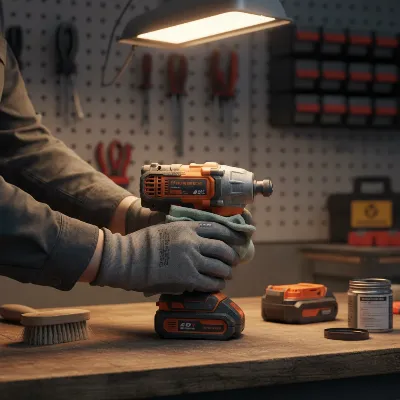 Person cleaning and inspecting an impact driver for general maintenance
Expert Advice from ReviewedJobs.com
As an Admin of ReviewedJobs.com with over a decade of hands-on experience with impact drivers, I’ve seen firsthand how proper care can transform a tool’s performance and lifespan. Here are some insights to help you make informed decisions about your impact driver’s maintenance.
Recognizing When Professional Service is Needed
While DIY lubrication is empowering, there are times when professional intervention is warranted. If, after thorough cleaning and lubrication, your impact driver still exhibits persistent unusual noises, significant loss of power, excessive vibration, or if the tool simply stops working, it’s likely time to seek professional service. Don’t attempt complex repairs if you’re unsure, as this can lead to further damage or safety risks. A qualified technician can diagnose underlying issues, such as worn gears, motor problems, or internal component damage that go beyond basic lubrication.
The Importance of Manufacturer’s Recommendations
Always that your impact driver’s owner’s manual is your ultimate authority. Manufacturers design their tools with specific tolerances and material requirements, and their recommendations for lubricants, disassembly procedures, and maintenance schedules are based on extensive engineering and testing. Deviating from these guidelines can void your warranty and potentially cause irreparable damage. If you’re unsure about a lubricant type or a maintenance step, always refer to your manual first or contact the manufacturer directly.
A Pro’s Perspective on Longevity
“From years in the field, I can tell you that consistency in maintenance, not just one-off fixes, truly defines a tool’s longevity. A small amount of preventive care, like regular anvil lubrication and cleaning, prevents major headaches down the road. It’s about respecting your tools and the work they do.” – [Your Name/Admin, ReviewedJobs.com], Impact Driver Specialist
The difference between a tool that lasts for a few years and one that serves you for over a decade often comes down to proactive maintenance. Don’t wait for your impact driver to fail before you consider its care. Incorporate these lubrication and general maintenance tips into your routine, and your impact driver will reward you with reliable performance on countless projects.
Conclusion
The impact driver is an indispensable tool for countless tasks, from intricate DIY projects to demanding professional applications. Ensuring its longevity and consistent performance hinges significantly on one often-overlooked aspect: the proper lubrication of its anvil. By understanding the anvil’s function, recognizing the signs it needs attention, and following a safe, step-by-step DIY lubrication process, you can dramatically extend your tool’s life and maintain its powerful efficiency. From selecting the right specialized grease to adhering to vital safety precautions and avoiding common mistakes, each step contributes to your impact driver remaining a reliable workhorse. Regular cleaning, proper storage, and diligent inspection further reinforce its durability, ensuring it’s always ready for the next challenge. Prioritizing these maintenance practices will not only save you money on potential repairs but also enhance your overall working experience.
What small maintenance task will you tackle first to boost your tool’s performance?
Frequently Asked Questions
What kind of grease should I use for my impact driver anvil?
For most cordless impact drivers, a high-quality, high-melting point lithium-based grease or a specialized impact tool grease is recommended. Avoid greases containing molybdenum disulfide (moly grease) as they can hinder performance. Always check your tool’s manual for specific manufacturer recommendations.
How often should I lubricate my impact driver anvil?
The frequency depends on usage. For professional or frequent use, lubricating the anvil every few months or annually is a good practice. For occasional DIY use, once a year might suffice. Pay attention to signs of reduced power, increased heat, or unusual noises, which indicate a need for lubrication.
Can I use WD-40 to lubricate my impact driver?
No, WD-40 is not a suitable lubricant for an impact driver’s anvil or internal mechanism. It is primarily a penetrating oil and water dispersant, not a long-lasting lubricant. Using it can thin out existing grease, offer minimal protection, and potentially attract more dirt, leading to faster wear.
What happens if I don’t lubricate my impact driver anvil?
Neglecting anvil lubrication leads to increased friction and heat within the impact mechanism. This can result in reduced power output, sluggish operation, premature wear of internal components (like the hammer and anvil), and eventually, complete tool failure. It significantly shortens the tool’s lifespan.
Is it hard to open an impact driver for lubrication?
Disassembling an impact driver for lubrication requires care and the right tools (screwdrivers/hex keys). It’s a moderately difficult DIY task, but manageable for most. Taking photos during disassembly and carefully noting the position of parts will greatly assist with reassembly. If you’re uncomfortable, seek professional help.
Frequently Asked Questions
What kind of grease should I use for my impact driver anvil?
For most cordless impact drivers, a high-quality, high-melting point lithium-based grease or a specialized impact tool grease is recommended. Avoid greases containing molybdenum disulfide (moly grease) as they can hinder performance. Always check your tool's manual for specific manufacturer recommendations.
How often should I lubricate my impact driver anvil?
The frequency depends on usage. For professional or frequent use, lubricating the anvil every few months or annually is a good practice. For occasional DIY use, once a year might suffice. Pay attention to signs of reduced power, increased heat, or unusual noises, which indicate a need for lubrication.
Can I use WD-40 to lubricate my impact driver?
No, WD-40 is not a suitable lubricant for an impact driver's anvil or internal mechanism. It is primarily a penetrating oil and water dispersant, not a long-lasting lubricant. Using it can thin out existing grease, offer minimal protection, and potentially attract more dirt, leading to faster wear.
What happens if I don't lubricate my impact driver anvil?
Neglecting anvil lubrication leads to increased friction and heat within the impact mechanism. This can result in reduced power output, sluggish operation, premature wear of internal components (like the hammer and anvil), and eventually, complete tool failure. It significantly shortens the tool's lifespan.
Is it hard to open an impact driver for lubrication?
Disassembling an impact driver for lubrication requires care and the right tools (screwdrivers/hex keys). It's a moderately difficult DIY task, but manageable for most. Taking photos during disassembly and carefully noting the position of parts will greatly assist with reassembly. If you're uncomfortable, seek professional help.
How to Safely Lubricate Your Impact Driver Anvil
Lubricating your impact driver's anvil enhances performance and extends its lifespan. Follow these steps for a safe and effective DIY maintenance session.
Before starting, ensure your impact driver is completely de-energized by removing the battery pack or disconnecting the air hose. Always wear safety glasses and gloves to protect yourself from debris, grease, and solvents. Work in a well-lit and well-ventilated area, keeping children and pets away.
Using appropriate screwdrivers or hex keys, carefully remove the screws holding the tool's head or housing together. Pay close attention to the order of parts and consider taking photos for reassembly. Gently pry open the housing to expose the anvil and hammer mechanism components.
With the internal components exposed, use a clean cloth and a degreaser or solvent to meticulously wipe away all old, dirty, and hardened grease from the anvil, hammer, and other moving parts. Ensure all debris, metal shavings, or dirt particles are removed, as fresh grease applied over contaminants is ineffective.
Apply a thin, even coat of your chosen impact driver grease (lithium-based or specialized impact tool grease) to the critical contact points, including the anvil shaft and hammer faces. Do not overpack the mechanism with grease, as excessive lubricant can impede movement and collect debris. Use a small brush, cotton swab, or gloved finger for precise application.
Carefully reassemble your impact driver, referring to any photos taken during disassembly to ensure all components are correctly positioned. Securely tighten all screws without over-tightening. Reinsert the battery or reconnect the air hose, then test the tool at low speed to ensure smooth function and absence of unusual noises or vibrations before putting it under load.

Great guide on keeping these tools running. I’ve had issues with reduced power on my DeWalt 20V Max, and it turns out my anvil was pretty gunked up. The disassembly and cleaning part was a bit fiddly, but the instructions were clear enough to get through it. Wish I’d known about this sooner to prevent some wear.
I tried lubricating my Milwaukee impact driver’s anvil following these steps, and while it did help a little with the increased heat I was experiencing, I found the reassembly to be a real pain. Getting everything back in place correctly took me a couple of tries. It’s a good idea in theory, but maybe not for everyone.
I’ve always just used whatever grease I had lying around for my impact driver, but after reading about the importance of specialized lithium-based grease, I decided to give it a try. The difference is noticeable! My old Ryobi feels smoother and has more consistent power now. Definitely worth the extra step to do it right.
My old Craftsman impact driver was starting to sound rough and felt like it was losing torque. I followed the advice here about cleaning the hammer mechanism and applying new grease, and it’s like a new tool! It’s amazing how much difference proper maintenance makes. This definitely extended the lifespan of my go-to driver.