When an impact driver fails to turn on, the most common culprits are a drained or faulty battery, corroded battery terminals, a malfunctioning charger, or a defective trigger switch. Other issues can include worn carbon brushes, internal wiring problems, or the tool’s overheating safeguards activating. Addressing these issues systematically can often restore functionality quickly.
Understanding Why Your Impact Driver Won’t Turn On
An impact driver is a sophisticated piece of machinery, and when it refuses to cooperate, the problem usually stems from a handful of common areas. Identifying the root cause is the first step toward a successful repair.
Battery and Charger Failures
The most frequent reason a cordless impact driver fails to power on is a problem with its energy source. This could range from a simple drained battery to a more complex internal cell failure within the battery pack itself. Corrosion on battery terminals can also obstruct the flow of power, as can a malfunctioning charger that isn’t delivering adequate juice to the battery. For shop curated cordless impact on this site.
Trigger Switch Malfunctions
The trigger switch is the primary interface between you and your tool’s motor. Given its constant use, it’s prone to wear and tear. Dust, debris, or moisture can accumulate inside the switch mechanism, causing it to stick, make intermittent contact, or fail entirely. A broken internal component within the switch can also prevent power from reaching the motor.
Motor and Brush Wear
For impact drivers with brushed motors, carbon brushes are critical components that transfer electricity to the motor’s commutator. Over time, these brushes wear down, losing their ability to make consistent contact. This can lead to a complete loss of power, reduced performance, or excessive sparking. Even brushless motors, while more durable, can still experience internal winding issues or controller board failures that prevent them from starting.
Internal Wiring Problems
Inside every impact driver is a network of wires connecting the battery, switch, and motor. Any break, fray, or loose connection in this wiring harness can interrupt the electrical circuit, causing the tool to stop working. Damaged terminals or cold solder joints are also common points of failure that can be difficult to spot without opening the tool.
Overheating Safeguards
Modern impact drivers are designed with thermal protection systems to prevent damage from excessive heat. If your tool is pushed too hard, used continuously for extended periods, or has blocked ventilation, it might overheat. When this happens, the tool’s internal electronics will often shut it down to prevent permanent damage. It will then refuse to turn on until it has cooled sufficiently.
Essential Tools for Impact Driver Troubleshooting
Before diving into repairs, ensure you have the right tools on hand. Having these items will streamline your troubleshooting process and make repairs safer and more efficient.
- Multimeter: Absolutely essential for testing voltage, continuity, and diagnosing electrical faults in the battery, charger, switch, and wiring.
- Screwdriver Set: You’ll likely need various sizes and types, including Phillips, Torx (often security Torx), and possibly flathead, to open the tool casing.
- Electrical Contact Cleaner: An aerosol spray designed to clean electrical contacts, removing dirt, grime, and corrosion.
- Compressed Air: Useful for blowing out dust and debris from vents, trigger mechanisms, and internal components.
- Fine-Grit Sandpaper (400-600 grit) or Brass Wire Brush: For gently cleaning corroded battery terminals or other metal contacts.
- Small Pliers/Tweezers: Handy for manipulating small wires, connectors, and removing tiny components.
- Safety Glasses: Crucial for protecting your eyes from flying debris or unexpected sparks during testing and repair.
- Work Gloves: To protect your hands and provide a better grip.
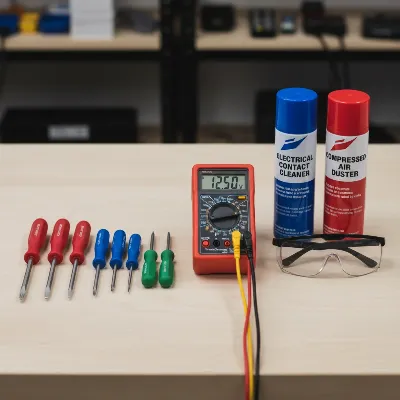 Essential tools for diagnosing and repairing a non-functional impact driver
Step-by-Step Troubleshooting Guide for a Dead Impact Driver
When your impact driver refuses to power up, a systematic approach is key to quickly pinpointing the problem. Start with the simplest checks and gradually move to more intricate internal diagnostics.
Initial Checks: The Obvious First Steps
|
Our Picks for the Best Impact Driver in 2026
As an Amazon Associate I earn from qualifying purchases.
|
||
| Num | Product | Action |
|---|---|---|
| 1 | DEWALT DCF850B 20V Cordless Brushless Compact 1/4'' Impact Driver (Tool Only) (DCF850B-NBX) |

|
| 2 | Impact Driver: 21V 1/4" Hex Cordless Impact Driver, 230N.m (2,035in-lbs) Brushless Impact Driver Drill Set, 20Psc Screwdriver Bits, 2.0 Ah Battery, Variable Speed for DIY and Automotive |
|
| 3 | DEWALT 20V MAX XR Impact Driver, 1/4 Inch High Torque Brushless 3 Speed Premium Cordless with LED Light, Extended Runtime, Tool Only (DCF845B) |
|
| 4 | DEWALT 20V MAX Impact Driver, 1/4 Inch, Battery and Charger Included (DCF787D1) |
|
| 5 | DEWALT 20V MAX Cordless Impact Wrench, 1/2 Impact Gun, 4-Speed High Torque with Hog Ring Anvil and LED Light, Brushless Motor, Precision Wrench, Tool Only (DCF900B) |
|
| 6 | BLACK+DECKER 20V MAX* POWERCONNECT 1/4 in. Cordless Impact Driver Kit (BDCI20C) |
|
| 7 | DEWALT ATOMIC 20V MAX* Impact Driver, Cordless, Compact, 1/4-Inch, Tool Only (DCF809B) |
|
| 8 | Milwaukee Electric - M18 Fuel. 1/4 HEX Impact Driver |
|
| 9 | DEWALT 20V MAX Cordless Drill and Impact Driver, Power Tool Combo Kit , Includes 2 Batteries, Charger and Bag (DCK240C2) |
|
| 10 | AVID POWER 20V Brushless Impact Driver Kit, 2220in-lbs High Torque, 2-Speed Mode, Variable Speed Cordless Impact Driver, Brake Stop Function, Compact Design with LED Light, 4 Sockets & 4 Bits Included |
|
Always begin with the most straightforward explanations, as they are often the easiest to overlook.
- Battery Charge and Condition: First, ensure your battery is fully charged. Pop it onto the charger and confirm the charging indicator lights are active. If the battery is hot to the touch, it might have initiated a thermal shutdown; let it cool down before attempting to charge or use it. If you have another fully charged battery, try swapping it out to see if the tool powers on. This instantly tells you if the problem lies with the original battery or the tool itself.
- Battery Contacts: Inspect the metal contacts on both the battery and the tool. Look for any signs of corrosion (green or white powdery buildup), dirt, or physical damage. Clean any corrosion with a fine-grit sandpaper or brass wire brush, then apply electrical contact cleaner to ensure a clear pathway for power. A loose connection here can prevent any current from flowing.
- Charger Functionality: If the battery seems fine, the charger might be the culprit. Plug the charger into an outlet and observe its indicator lights. If there are no lights or error codes, the charger itself might be faulty. Use your multimeter to test the charger’s output voltage. Refer to the charger’s label for the expected voltage; the multimeter reading should be close to this value. If it reads zero, the charger is likely dead.
Investigating the Trigger Switch
The trigger switch endures constant mechanical stress, making it a common point of failure.
- Listening for Clicks and Cleaning: With the battery inserted, gently press the trigger. Do you hear a faint click? A lack of mechanical sound might indicate the switch is physically stuck or broken. Try blasting compressed air into the trigger area to dislodge any dust or debris that might be impeding its movement.
- Testing with a Multimeter (Requires opening): If basic cleaning doesn’t work, you’ll need to open the tool casing to access the switch. Always remove the battery before opening the tool. Once the switch is exposed, set your multimeter to the continuity setting. Place the probes on the input and output terminals of the switch. When the trigger is pressed, a healthy switch should show continuity (usually a beep or a reading of 0 ohms). If it remains open-circuit even when pressed, the switch is faulty and needs replacement.
Examining the Motor and Carbon Brushes
For impact drivers equipped with brushed motors, worn carbon brushes are a frequent cause of power loss.
- Signs of Worn Brushes: Excessive sparking visible through the tool’s ventilation slots, a burning smell, or intermittent power can all point to worn brushes. If your tool has been in heavy use for years, it’s highly probable the brushes are near the end of their lifespan.
- Inspection and Replacement: After opening the tool, locate the carbon brushes, typically housed in small plastic holders on either side of the motor. Remove them and inspect their length. If they are significantly shorter than new brushes (often less than 1/4 inch or 6mm remaining), they need replacement. Ensure the new brushes are correctly seated and move freely in their holders. For brushless motors, diagnosing a motor fault usually requires professional attention, as it often involves the motor’s internal electronics or windings.
Checking Internal Wiring and Connections
Even a small break in a wire can disable your tool.
- Visual Inspection for Damage: With the casing open and the battery removed, carefully examine all visible wires for fraying, cuts, pinching, or discoloration (which can indicate overheating). Pay close attention to connections at the battery terminals, the trigger switch, and the motor.
- Continuity Testing: Use your multimeter on the continuity setting to test individual wires. Place one probe at the start of a wire and the other at its end. A lack of continuity indicates a break in the wire. Also, check the integrity of any quick-connect terminals; sometimes they can become loose or corroded internally.
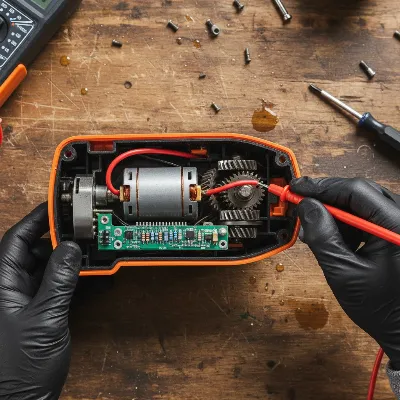 Technician inspecting the internal wiring of an impact driver with a multimeter
The Role of Internal Fuses and Bearings
Some manufacturers, particularly Makita, integrate internal fuses into their impact drivers as a protective measure.
- Identifying a Blown Fuse: If your Makita impact driver suddenly died, especially after a period of intense use or an unusual noise, an internal fuse might have blown. These fuses are typically soldered onto the motor’s circuit board or within the battery’s protection circuit. A blown fuse will appear visibly broken or will show no continuity when tested with a multimeter. Replacing it requires soldering skills.
- Bearing Failure Impact: A common cause for a fuse to blow or a motor to fail prematurely is a worn or seized rotor bearing. When a bearing fails, it increases friction and forces the motor to draw excessive current, which can trigger the fuse or burn out the motor. If you notice grinding noises or stiffness when trying to manually turn the motor shaft (with the battery removed), a bad bearing is a strong possibility.
Addressing Overheating Issues
Impact drivers, especially when pushed to their limits, can get hot.
- Recognizing Overheat Symptoms: If your impact driver feels excessively hot, smells of burning plastic, or simply stops working after prolonged heavy use, it’s likely gone into thermal shutdown. Brushless models often have LED indicators that flash when an overheat condition is detected.
- Cooling and Prevention: Allow the tool to cool down completely, usually for 15-30 minutes, before attempting to restart it. Ensure the ventilation vents are clear of dust and debris, as blockages can trap heat. During use, avoid forcing the tool and take breaks to let it dissipate heat, especially when tackling demanding tasks.
Safety First: Important Precautions During Repair
Working with power tools, even when they’re not functioning, requires adherence to strict safety protocols. Your safety is paramount.
- Always Remove the Battery: This is the golden rule. Before opening the tool, inspecting internal components, or performing any electrical tests that involve direct contact with internal wiring, always remove the battery pack. For corded tools, unplug them from the power source. This eliminates the risk of accidental startup or electrical shock.
- Wear Safety Glasses: Small parts can snap, wires can spark, and debris can fly. Safety glasses are non-negotiable to protect your eyes.
- Use Insulated Tools: Whenever possible, use screwdrivers and other hand tools with insulated handles, especially if you’re working near electrical components.
- Work in a Well-Lit Area: Good visibility helps prevent mistakes and ensures you can clearly see small wires and connections.
- Be Mindful of Capacitors: Some tools may contain capacitors that can hold a charge even after the battery is removed. While less common in simple impact drivers, it’s good practice to be aware and avoid touching circuit board components unnecessarily.
- Handle Li-ion Batteries with Care: Lithium-ion batteries can be dangerous if mishandled. Never short the terminals, puncture the casing, or expose them to extreme heat. If a battery is swollen or severely damaged, it should be safely disposed of and replaced.
- Don’t Force Components: If a part doesn’t come out easily, double-check for hidden screws, clips, or a specific removal technique. Forcing can cause irreversible damage.
- If Unsure, Seek Professional Help: If you’re uncomfortable with any step, lack the necessary tools, or suspect a complex electronic issue, it’s always best to consult a certified repair technician. Attempting repairs beyond your skill level can lead to further damage or personal injury.
When to Repair vs. Replace Your Impact Driver
Deciding whether to repair a dead impact driver or invest in a new one often boils down to a cost-benefit analysis.
Cost-Benefit Analysis
Consider the age and overall condition of your tool. If it’s an older model showing significant wear, or if multiple components are failing, the cost of parts and your time might outweigh the cost of a new, more efficient model. Simple fixes like replacing carbon brushes, cleaning contacts, or even a new battery can be cost-effective. However, if the motor is burnt out, the main circuit board is fried, or multiple internal wires are damaged, repairs can become expensive and time-consuming. Compare the estimated repair cost (parts + labor, if hiring a professional) against the price of a comparable new impact driver.
Professional Help
For complex issues involving motor windings, internal circuit board failures, or if you lack confidence in performing intricate repairs, professional help is a sensible option. Many manufacturers offer authorized service centers, and local tool repair shops can often diagnose and fix issues for a reasonable fee. Sometimes, a professional diagnosis can confirm if the tool is truly beyond economical repair, saving you further effort and expense.
Expert Advice from ReviewedJobs.com
From my extensive experience on ReviewedJobs.com, I’ve learned that prevention and smart usage are just as crucial as knowing how to troubleshoot.
Regular Maintenance Tips
“Just like any high-performance vehicle, your impact driver thrives on regular care. A quick blast of compressed air to clear the vents after a dusty job can prevent overheating. Regularly checking battery contacts for corrosion ensures consistent power delivery. And if your tool has a brushed motor, keep an eye on those carbon brushes—they’re consumable parts, not lifetime components. Proactive maintenance truly extends the life of your tools and saves you from unexpected downtime.” – Admin, ReviewedJobs.com
Investing in Quality
While a budget tool might seem appealing upfront, investing in a reputable brand often pays dividends in reliability and repairability. Higher-quality impact drivers typically use more durable components, have better seals against dust and moisture, and their parts are often more readily available for replacement. Premium brands often incorporate advanced diagnostic features, like LED indicators for overheating or battery status, which can significantly aid in troubleshooting. When a tool is critical to your work, reliability becomes a major factor, and quality usually equates to fewer breakdowns and easier fixes.
Conclusion
A non-responsive impact driver doesn’t necessarily mean the end of its useful life. By systematically checking the battery, charger, trigger switch, motor components, and internal wiring, you can often diagnose and resolve the issue yourself. to prioritize safety by always removing the battery before opening the tool and wearing appropriate protective gear. While some fixes are straightforward, complex problems might warrant professional intervention or a decision to invest in a new tool. Regular maintenance and a smart approach to troubleshooting will not only save you money but also keep your essential impact driver performing reliably for years to come. What’s the most common issue you’ve faced with your impact driver, and how did you resolve it?
Frequently Asked Questions
Why does my impact driver stop working intermittently?
Intermittent operation often points to loose battery connections, worn carbon brushes making inconsistent contact, or a faulty trigger switch that isn’t always completing the circuit. Overheating can also cause the tool to cut out temporarily before restarting once cooled.
Can I use a battery with a different voltage in my impact driver?
No, you should never use a battery with a different voltage than what your impact driver is rated for. Doing so can severely damage the tool’s motor, electronics, or the battery itself, and may pose a safety risk. Always match the battery voltage to your tool’s specifications.
How often should I replace impact driver carbon brushes?
The lifespan of carbon brushes varies significantly based on usage intensity. For light, occasional use, they might last for years. For heavy, daily professional use, they might need replacing every few months. Watch for signs like excessive sparking, reduced power, or intermittent operation.
What are the signs of a failing impact driver motor?
Signs of a failing motor include grinding noises, a burning smell, excessive heat, significant loss of power, or the tool simply refusing to turn on despite other components being functional. For brushed motors, worn brushes can mimic motor failure, so check those first.
Is it safe to repair my impact driver myself?
Yes, many common impact driver issues can be safely repaired by a DIY enthusiast with basic tools and electrical knowledge. However, it’s crucial to follow safety precautions, especially disconnecting the battery, and to avoid attempting complex repairs involving circuit boards if you’re not experienced. If in doubt, consult a professional.
Frequently Asked Questions
Why does my impact driver stop working intermittently?
Intermittent operation often points to loose battery connections, worn carbon brushes making inconsistent contact, or a faulty trigger switch that isn't always completing the circuit. Overheating can also cause the tool to cut out temporarily before restarting once cooled, typically after 15-30 minutes.
Can I use a battery with a different voltage in my impact driver?
No, you should never use a battery with a different voltage than what your impact driver is rated for. Doing so can severely damage the tool's motor, electronics, or the battery itself, and may pose a significant safety risk. Always match the battery voltage to your tool's specifications exactly.
How often should I replace impact driver carbon brushes?
The lifespan of carbon brushes varies significantly based on usage intensity. For light, occasional use, they might last for years. For heavy, daily professional use, they might need replacing every few months, especially if they are shorter than 1/4 inch (6mm). Watch for signs like excessive sparking, reduced power, or intermittent operation.
What are the signs of a failing impact driver motor?
Signs of a failing motor include grinding noises, a burning smell, excessive heat, significant loss of power, or the tool simply refusing to turn on despite other components being functional. For brushed motors, worn brushes can mimic motor failure, so always check those first before assuming a motor issue.
Is it safe to repair my impact driver myself?
Yes, many common impact driver issues can be safely repaired by a DIY enthusiast with basic tools and electrical knowledge. However, it's crucial to follow safety precautions, especially disconnecting the battery before opening the tool, and to avoid attempting complex repairs involving circuit boards if you're not experienced. If in doubt, consult a professional technician.
How to Troubleshoot a Dead Impact Driver
A systematic approach to diagnosing and fixing common issues when your impact driver won't turn on, from battery checks to internal component inspection.
Ensure your battery is fully charged and its contacts are clean. Swap with a known good battery if available. Test the charger's output voltage with a multimeter to confirm it's functioning correctly, aiming for a reading close to the label's specified voltage.
Listen for a click when pressing the trigger and use compressed air to clear debris. If necessary, open the tool (after removing the battery) and use a multimeter on the continuity setting to test the switch. A healthy switch should show continuity when pressed.
For brushed motors, look for excessive sparking or a burning smell. Open the tool to inspect carbon brushes; replace them if they are significantly shorter than 1/4 inch (6mm). For brushless motors, professional diagnosis is usually required for internal faults.
Visually inspect all internal wires for fraying, cuts, or loose connections. Use a multimeter to test for continuity in individual wires and quick-connect terminals. For some models, like Makita, check for a blown internal fuse on the motor's circuit board.
If the tool feels excessively hot or smells burnt, it may have entered thermal shutdown. Allow it to cool for 15-30 minutes. Ensure ventilation vents are clear of dust and debris to prevent future overheating during demanding tasks.

Good info here. My Ryobi impact driver was acting up, and I thought the battery was totally dead. Turns out, the charger itself was the problem. Didn’t even consider that until I read about it. Replaced the charger and now it’s back to full power for all my weekend projects.
I was ready to toss my old DeWalt when it just stopped turning on. The tip about checking for corroded battery terminals saved me! A quick clean with a pencil eraser and it fired right up. So glad I didn’t have to buy a new one, especially with how expensive those pro-grade tools can be.
This was super helpful! My Craftsman impact driver suddenly quit on me in the middle of a deck build. I was worried it was a major internal wiring issue. Turns out, it was just the overheating safeguard kicking in. Let it cool down for 20 minutes and it was good to go. Saved me a lot of frustration and a trip to the hardware store.
My Milwaukee impact driver has been giving me grief. I went through all the steps, checked the battery, the charger, even cleaned the terminals. Still nothing. It seems like it might be the trigger switch, which is a bit more involved than I’m comfortable fixing myself. Wish there was a simpler solution for that.