Impact drivers with brushed motors require regular cleaning of their carbon brushes every 3-6 months with regular use to maintain peak performance and extend tool lifespan. This maintenance prevents reduced power, excessive sparking, and intermittent operation caused by dust and grime buildup. Cleaning involves safely disconnecting power, accessing the brushes, wiping away carbon dust with a lint-free cloth, and reassembling the tool.
What Are Impact Driver Brushes?
In brushed impact drivers, carbon brushes are essential electrical components that transfer current from the stationary motor part (stator) to the rotating part (rotor or armature). Made from carbon for its conductivity and lubricating properties, these brushes maintain constant contact with the commutator, an array of copper segments on the armature. This contact facilitates electrical current flow, generating the magnetic fields that power the motor.
In contrast, brushless impact drivers use electronic controllers for power delivery, eliminating physical brushes. This design offers less friction, more efficient power transfer, longer tool life, and reduced maintenance. However, many powerful and affordable impact drivers still utilize brushed motors, making brush care a critical aspect of their upkeep. For explore our cordless impact reviews on this site.
When to Clean or Replace Your Impact Driver Brushes
Identifying when your impact driver’s brushes need attention is crucial for preventing damage and maintaining optimal tool performance. Several signs indicate that carbon brushes may be worn, dirty, or require replacement.
A common indicator is reduced performance; if your impact driver feels weaker or struggles with tasks it once handled easily, worn brushes could be the cause. Another clear sign is excessive sparking around the motor vents. While minor sparks are normal, a noticeable increase or bright, constant sparking suggests poor brush-to-commutator contact due to wear or carbon buildup. Lastly, intermittent operation, where the tool starts and stops unexpectedly or runs erratically, often points to failing brushes. This inconsistency occurs when the electrical connection becomes unreliable. Addressing these signs promptly can prevent costly repairs or the need for a new tool.
Tools and Materials You’ll Need
Before beginning the cleaning process, gather the necessary tools and materials for a smooth and efficient job. Having everything at hand will prevent interruptions and simplify the task.
Here’s what you’ll typically need:
- Screwdriver set: Various sizes and types (Phillips, Torx, flathead) are often needed to open the impact driver casing or remove brush caps.
- Soft, lint-free cloth: Essential for wiping away dust and debris without leaving fibers. Microfiber cloths work well.
- Small, soft brush: An old toothbrush, detail brush, or small paint brush is perfect for gently sweeping away carbon dust from brushes and internal components.
- Low-pressure compressed air (optional but recommended): A can of compressed air or an air compressor with a low-pressure nozzle can effectively blow out fine dust from crevices. Avoid high-pressure air, as it can force debris deeper into the tool.
- Isopropyl alcohol (optional): For stubborn grease or oil deposits, dampen a cloth with isopropyl alcohol to clean brushes and the commutator. Ensure thorough drying afterwards.
- Commutator cleaning stone or fine-grit sandpaper (optional): For cleaning the commutator if it shows significant buildup or scoring. Use with extreme caution.
- Safety glasses: Always protect your eyes from flying dust or debris.
- Work light: To ensure good visibility of internal components.
- Small container: To keep screws and small parts organized.
Step-by-Step Guide to Cleaning Your Impact Driver Brushes
Cleaning the brushes in your impact driver is a straightforward process that can significantly improve your tool’s longevity and performance. Follow these steps carefully to ensure a thorough and safe cleaning.
Safety First: Disconnecting Power
|
Our Picks for the Best Impact Driver in 2026
As an Amazon Associate I earn from qualifying purchases.
|
||
| Num | Product | Action |
|---|---|---|
| 1 | Impact Driver: 21V 1/4" Hex Cordless Impact Driver, 230N.m (2,035in-lbs) Brushless Impact Driver Drill Set, 20Psc Screwdriver Bits, 2.0 Ah Battery, Variable Speed for DIY and Automotive |

|
| 2 | DEWALT ATOMIC 20V MAX* Impact Driver, Cordless, Compact, 1/4-Inch, Tool Only (DCF809B) |
|
| 3 | DEWALT 20V MAX Cordless Impact Wrench, 1/2 Impact Gun, 4-Speed High Torque with Hog Ring Anvil and LED Light, Brushless Motor, Precision Wrench, Tool Only (DCF900B) |
|
| 4 | Milwaukee Electric - M18 Fuel. 1/4 HEX Impact Driver |
|
| 5 | BLACK+DECKER 20V MAX* POWERCONNECT 1/4 in. Cordless Impact Driver Kit (BDCI20C) |
|
| 6 | DEWALT 20V MAX Cordless Drill and Impact Driver, Power Tool Combo Kit , Includes 2 Batteries, Charger and Bag (DCK240C2) |
|
| 7 | DEWALT 20V MAX XR Impact Driver, 1/4 Inch High Torque Brushless 3 Speed Premium Cordless with LED Light, Extended Runtime, Tool Only (DCF845B) |
|
| 8 | DEWALT 20V MAX Impact Driver, 1/4 Inch, Battery and Charger Included (DCF787D1) |
|
| 9 | AVID POWER 20V Brushless Impact Driver Kit, 2220in-lbs High Torque, 2-Speed Mode, Variable Speed Cordless Impact Driver, Brake Stop Function, Compact Design with LED Light, 4 Sockets & 4 Bits Included |
|
| 10 | DEWALT DCF850B 20V Cordless Brushless Compact 1/4'' Impact Driver (Tool Only) (DCF850B-NBX) |
|
The first and most critical step before any maintenance is to ensure your impact driver is completely disconnected from its power source. For cordless models, remove the battery pack. For corded tools, unplug the power cord from the electrical outlet. This precaution eliminates any risk of accidental startup or electrical shock, protecting both you and the tool. Never skip this step, regardless of how quick the task seems.
Accessing the Motor Brushes
To reach the motor brushes, you will need to open the tool’s housing. This process varies by impact driver make and model. Generally, several screws hold the casing together; carefully remove them and place them in your small container. Gently pry open the housing, avoiding damage to internal wires or components. Some models have dedicated brush caps on the exterior, which can be unscrewed to access the brushes without opening the entire casing. Once the housing is open or caps are removed, you should see the carbon brushes, often held by springs.
Inspecting the Brushes and Commutator
With the brushes exposed, inspect their condition. Look for signs of wear: Are they significantly shortened, chipped, or cracked? If severely worn or damaged, cleaning won’t suffice, and they will need replacement. Also, examine the commutator, the copper segments on the armature where brushes make contact. It should be relatively smooth and clean. Look for excessive carbon buildup, pitting, or deep grooves, which can indicate poor brush contact or other motor issues. Light discoloration or slight wear is normal, but heavy black deposits or rough surfaces require attention.
Cleaning the Brushes
If your brushes are not excessively worn but simply dirty, proceed with cleaning. Gently remove the carbon brushes from their holders, being mindful of any tension springs. Use your soft, lint-free cloth to wipe away loose carbon dust or debris from the brush surfaces. For more persistent grime, lightly dampen the cloth with isopropyl alcohol and carefully clean the brush surfaces. Isopropyl alcohol evaporates quickly and is safe for electronics, helping to dissolve oil and grease deposits. Ensure the brushes are completely dry before reinserting them. For difficult-to-reach areas, use a small, soft brush to gently sweep away dust.
Cleaning the Commutator
If inspection revealed carbon buildup or minor scoring on the commutator, it’s important to clean this surface. For light dust, use a soft, lint-free cloth. For more significant carbon deposits, a commutator cleaning stone or very fine-grit sandpaper (600-grit or higher) can be used with extreme caution. Lightly press the stone or sandpaper against the commutator while gently spinning the armature by hand. The goal is to remove buildup, not to reshape the commutator. Avoid aggressive sanding, as this can cause permanent damage. After cleaning, use low-pressure compressed air or a soft brush to remove any remaining dust or particles from the commutator and surrounding motor area.
Reassembling Your Impact Driver
Once the brushes and commutator are clean and dry, carefully reinsert the brushes into their holders, ensuring the springs provide proper tension. Make sure the brushes are oriented correctly, as they typically have a specific angle to match the commutator’s curve. If you removed brush caps, screw them back into place firmly. If you opened the tool’s housing, meticulously position all internal components, ensuring wires are not pinched or misaligned. Then, carefully close the casing halves and replace all the screws, tightening them snugly but avoiding over-tightening, which can strip the plastic. Finally, reinsert the battery or plug in the power cord and test your impact driver to ensure it operates smoothly.
Replacing Worn Brushes: When Cleaning Isn’t Enough
Sometimes, cleaning isn’t enough to restore your impact driver’s performance. If carbon brushes are significantly worn down, chipped, or damaged, they must be replaced. Continuing to use the tool with worn brushes can lead to more severe damage to the commutator and motor, potentially rendering the tool unusable.
Replacing brushes is often a simple DIY task. You’ll typically need to purchase a new set of carbon brushes specific to your impact driver model. Consult your tool’s manual or the manufacturer’s website for the correct part number. Many tool repair shops or online retailers specialize in power tool parts. Once you have the new brushes, the removal of old ones and installation of new ones follows a similar procedure to accessing and cleaning them. Always ensure the new brushes fit snugly and make proper contact with the commutator.
Maintaining Your Impact Driver for Longevity
Beyond brush care, general maintenance practices are crucial for extending the life of your impact driver. Regular cleaning and proper storage can prevent many common issues and keep your tool operating efficiently for years.
After each use, wipe down the exterior of your impact driver with a clean, dry cloth to remove dirt, dust, and grease. Pay attention to the air vents; gently blow low-pressure compressed air through them or use a soft brush to clear any obstructions. This helps the motor stay cool and prevents overheating. Inspect the chuck and bit holder area, removing any debris that could impede bit changes or affect torque transfer. For battery-powered tools, check the battery contacts for dirt or corrosion and clean them with a dry cloth if necessary. When not in use, store your impact driver in a clean, dry place, away from extreme temperatures and moisture. If storing for extended periods, remove the battery and store it separately in a cool, dry location. Regular inspection for loose fasteners or damaged parts can also catch issues before they escalate, ensuring your tool remains safe and reliable.
Expert Advice from ReviewedJobs.com
As an Admin at ReviewedJobs.com with over a decade of hands-on experience in impact driver maintenance and repair, I’ve seen firsthand the difference that proper care makes. My key advice is to approach tool maintenance with a proactive mindset. Don’t wait until your impact driver starts showing significant signs of struggle or sparking to address the brushes. Incorporate a quick brush inspection into your regular tool cleaning routine.
> “A well-maintained tool isn’t just about performance; it’s about safety and efficiency. Taking a few minutes to clean or inspect your impact driver’s brushes can save you hours of frustration and expensive repairs down the line.” – ReviewedJobs.com Admin, Impact Driver Expert
while cleaning is effective, it’s not a permanent fix for worn-out brushes. Know the signs of excessive wear, and don’t hesitate to replace them when necessary. Always refer to your tool’s specific manual for model-specific instructions, as designs can vary. Investing a little time in maintenance today will ensure your impact driver is always ready to tackle your toughest tasks tomorrow.
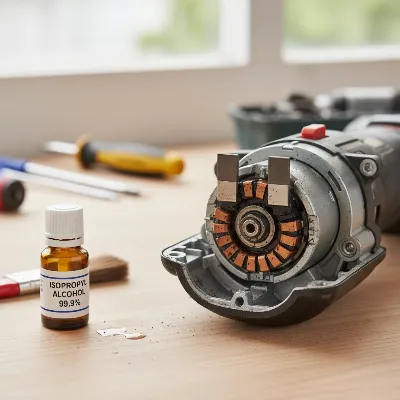 A disassembled impact driver showing carbon brushes and commutator, ready for cleaning.
Conclusion
Regular maintenance, particularly the cleaning of carbon brushes, is paramount for ensuring the longevity and efficient operation of your brushed impact driver. By understanding the function of these crucial components, recognizing the signs of wear, and following a methodical cleaning process, you can prevent common performance issues and costly repairs. Taking the time to care for your tools not only extends their lifespan but also ensures they perform optimally when you need them most. What other aspects of impact driver maintenance do you find most challenging?
Frequently Asked Questions
How often should I clean the brushes in my impact driver?
The frequency depends on usage, but a good rule of thumb is to inspect the brushes every 3-6 months with regular use. If you use your tool heavily or in dusty environments, check them more often. Clean them if you notice carbon buildup or any of the signs of wear mentioned in the article.
Can I use contact cleaner instead of isopropyl alcohol?
Electrical contact cleaner can be used, but ensure it is safe for plastics and motor components and evaporates completely without leaving residue. Isopropyl alcohol is generally a safer and readily available option for carbon brushes. Always test on an inconspicuous area first if unsure.
What happens if I don’t clean my impact driver brushes?
If you neglect cleaning, carbon dust and debris will accumulate, leading to reduced electrical contact, increased sparking, decreased motor efficiency, and eventual premature wear of both the brushes and the motor’s commutator. This can result in permanent damage to your tool.
Are all impact drivers brushed?
No, modern impact drivers are increasingly featuring brushless motors, which do not use carbon brushes. If your impact driver is a “brushless” model, this cleaning guide for brushes does not apply to your tool. Always check your tool’s specifications if you are unsure.
Where can I buy replacement brushes for my impact driver?
Replacement brushes can typically be found at power tool repair shops, authorized service centers, or online retailers like Amazon, eBay, or the manufacturer’s official website. You will need your impact driver’s model number to ensure you purchase the correct compatible brushes.
Clean Your Impact Driver's Carbon Brushes
This guide outlines the essential steps to clean the carbon brushes in your brushed impact driver, ensuring it maintains peak performance and extends its lifespan.
Before starting any maintenance, always ensure your impact driver is completely disconnected from its power source. For cordless models, remove the battery pack; for corded tools, unplug the power cord from the electrical outlet. This critical step prevents accidental startup or electrical shock.
Open the tool's housing by carefully removing screws and gently prying it open, or unscrew dedicated brush caps if your model has them. Keep all screws in a small container to avoid losing them. Once open, you should see the carbon brushes, often held in place by springs.
Examine the carbon brushes for significant wear, chips, or cracks; if severely damaged, they need replacement. Inspect the commutator (copper segments) for excessive carbon buildup, pitting, or deep grooves. Light discoloration is normal, but heavy deposits require attention.
Gently remove brushes and wipe away carbon dust with a soft, lint-free cloth. For stubborn grime, use a cloth lightly dampened with isopropyl alcohol, ensuring brushes are dry before reinsertion. For the commutator, use a soft cloth for light dust or a fine-grit sandpaper (600-grit+) with extreme caution for buildup, spinning the armature by hand.
Carefully reinsert the clean, dry brushes into their holders, ensuring springs provide proper tension and brushes are correctly oriented. Close the tool's casing, ensuring wires are not pinched, and replace all screws, tightening them snugly. Finally, reinsert the battery or plug in the power cord and test the tool.

My Milwaukee impact driver was definitely showing signs of reduced power when I was working on a deck project. I followed the advice about regular cleaning every 3-6 months and it’s made a noticeable difference. It’s a simple maintenance step that really extends the lifespan of these tools. Glad I found this before I just bought a new one!
I tried cleaning the brushes on my older Craftsman impact driver after it started having intermittent operation. While the instructions for wiping away carbon dust were clear, it didn’t completely fix my issue. It improved slightly, but I think my brushes might be too worn down and need replacing entirely, which wasn’t really covered. Still, good info for basic maintenance.
I’ve had my old Ryobi impact driver for years and it was starting to lose power, especially on tougher screws. I figured it was just dying, but after reading about cleaning the carbon brushes, I gave it a shot. It made a huge difference! The tool feels almost new again, and I saved myself from buying a replacement. Definitely worth the 20 minutes it took.
This guide was super helpful for understanding why my impact driver was sparking so much. I always thought that was normal wear and tear, but apparently not! Cleaning out the dust and grime from the brushes really cut down on the sparking. My only minor complaint is that getting to the brushes on my specific DeWalt model was a bit trickier than expected, but the general steps were spot on.