Replacing a worn or damaged chuck on a cordless impact driver is a straightforward repair that typically takes less than 15 minutes. Most modern impact drivers feature a 1/4-inch hex quick-release chuck, which is secured by a retaining ring, spring, and collar. This guide focuses on the safe and effective replacement of this common chuck type, ensuring your tool returns to optimal performance.
Understanding Your Impact Driver Chuck
Before diving into the replacement process, it’s beneficial to understand what an impact driver is and the type of chuck it typically uses. This foundational knowledge will make the task less daunting and highlight why specific steps are critical for safety and success.
What is an Impact Driver?
An impact driver is a powerful handheld tool designed specifically for driving screws and tightening fasteners with high torque. Unlike a conventional drill, an impact driver uses a hammering mechanism to deliver strong rotational and axial force, allowing it to drive large fasteners into dense materials with ease. This powerful action makes it invaluable for construction, woodworking, and automotive tasks. For see our cordless impact recommendations on this site.
Common Impact Driver Chuck Types
Most modern impact drivers feature a 1/4-inch hex quick-release chuck. This design allows for rapid bit changes by simply pulling back a collar, inserting a hex-shank bit, and releasing the collar. This mechanism typically relies on a retaining ring, a spring, a collar, and internal ball bearings to secure the bit.
It’s important to distinguish impact driver chucks from traditional drill chucks. While some drills might be mistakenly referred to as “impact drills” (often meaning hammer drills), their chucks typically differ. Drill chucks can be keyed or keyless and often thread onto a spindle, sometimes secured by a reverse-threaded screw inside. For impact drivers, the quick-release hex chuck is the standard, and its removal process is distinct from threaded drill chucks. This guide will focus on the procedure for the common quick-release hex chuck found on dedicated impact drivers.
When to Change Your Impact Driver Chuck
Recognizing when to replace your chuck can save you frustration and potential damage to your workpieces. Here are the primary reasons you might need a chuck replacement:
- Excessive Wear: Over time, the internal components (like the retaining ring or ball bearings) can wear down, leading to bits wobbling or failing to hold securely. This reduces efficiency and precision.
- Stuck or Broken Bits: A common issue is a screwdriver bit breaking off inside the chuck or becoming jammed, preventing other bits from being inserted or removed. Often, removing the chuck assembly is the only way to extract the stubborn remnant.
- Jammed Mechanism: Dirt, debris, or internal damage can cause the quick-release collar to seize, making bit changes impossible.
- Performance Degradation: If your impact driver isn’t engaging bits properly or you notice a loss of power transmission, a worn chuck could be the culprit.
Essential Tools and Materials for Chuck Replacement
Having the right tools on hand will make the chuck replacement process smoother and safer. Before you begin, gather the following:
- New Replacement Chuck Assembly: Ensure it’s compatible with your specific impact driver model. Check your tool’s manual or the manufacturer’s website for part numbers.
- Small Flathead Screwdriver: Used for prying the retaining ring and other delicate manipulations.
- Pick Tool (or Awl): Extremely helpful for catching edges of the retaining ring and guiding components.
- Work Gloves: To protect your hands from sharp edges and provide a better grip.
- Safety Glasses: Essential to protect your eyes from any flying springs or small components.
- Clean Work Surface: A well-lit, organized, and clean area to prevent losing small parts.
- Container for Small Parts: A magnetic tray or small bowl is ideal for keeping screws, springs, and ball bearings from rolling away.
Step-by-Step Guide to Safely Changing Your Impact Driver Chuck
Changing an impact driver chuck is a straightforward process that typically takes less than 15 minutes. However, precision and adherence to safety protocols are paramount.
Prioritize Safety First
|
Our Picks for the Best Impact Driver in 2026
As an Amazon Associate I earn from qualifying purchases.
|
||
| Num | Product | Action |
|---|---|---|
| 1 | DEWALT 20V MAX XR Impact Driver, 1/4 Inch High Torque Brushless 3 Speed Premium Cordless with LED Light, Extended Runtime, Tool Only (DCF845B) |

|
| 2 | DEWALT 20V MAX Cordless Impact Wrench, 1/2 Impact Gun, 4-Speed High Torque with Hog Ring Anvil and LED Light, Brushless Motor, Precision Wrench, Tool Only (DCF900B) |
|
| 3 | Impact Driver: 21V 1/4" Hex Cordless Impact Driver, 230N.m (2,035in-lbs) Brushless Impact Driver Drill Set, 20Psc Screwdriver Bits, 2.0 Ah Battery, Variable Speed for DIY and Automotive |
|
| 4 | Milwaukee Electric - M18 Fuel. 1/4 HEX Impact Driver |
|
| 5 | AVID POWER 20V Brushless Impact Driver Kit, 2220in-lbs High Torque, 2-Speed Mode, Variable Speed Cordless Impact Driver, Brake Stop Function, Compact Design with LED Light, 4 Sockets & 4 Bits Included |
|
| 6 | DEWALT ATOMIC 20V MAX* Impact Driver, Cordless, Compact, 1/4-Inch, Tool Only (DCF809B) |
|
| 7 | BLACK+DECKER 20V MAX* POWERCONNECT 1/4 in. Cordless Impact Driver Kit (BDCI20C) |
|
| 8 | DEWALT 20V MAX Impact Driver, 1/4 Inch, Battery and Charger Included (DCF787D1) |
|
| 9 | DEWALT 20V MAX Cordless Drill and Impact Driver, Power Tool Combo Kit , Includes 2 Batteries, Charger and Bag (DCK240C2) |
|
| 10 | DEWALT DCF850B 20V Cordless Brushless Compact 1/4'' Impact Driver (Tool Only) (DCF850B-NBX) |
|
Before you even touch your tool, safety must be your top priority.
- Disconnect Power: Always remove the battery pack from cordless impact drivers, or unplug corded models. This prevents accidental activation, which could lead to severe injury.
- Wear PPE: Put on your safety glasses to shield your eyes from potential spring-loaded parts or debris. Wear work gloves for better grip and protection.
- Clear Your Workspace: Ensure your work area is clean, well-lit, and free of clutter. This minimizes the risk of tripping or losing small components during the repair. Use a designated tray for all removed parts.
Disassembling the Old Chuck
The process begins with carefully dismantling the existing chuck.
- Locate the Retaining Ring: At the front of your impact driver, just behind where the bit is inserted, you will see a thin metal ring. This is the retaining ring, which holds the entire chuck assembly in place.
- Remove the Retaining Ring: Using your pick tool and a small flathead screwdriver, carefully pry one end of the retaining ring away from the driver’s anvil (the part the chuck sits on). Once one section is lifted, gently work your way around the ring, prying it upwards and outwards until it’s completely free. This step requires patience, as the ring is spring-loaded and can be tricky. Place the removed ring in your small parts container.
- Remove Chuck Assembly Components: With the retaining ring off, the tension holding the chuck together is released. You can now carefully remove the chuck collar, followed by the spring, and then the flat washer. Be mindful that some models may have one or two small ball bearings within the anvil, which can easily fall out. You may need to gently tap the driver on your work surface to release them. Collect all these small components and place them in your container.
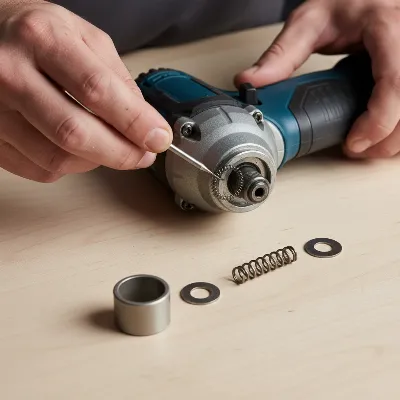 Disassembling an impact driver chuck, showing a pick tool removing the retaining ring and internal components laid out safely on a workbench.
Addressing a Stuck Bit
If your primary reason for chuck removal was a broken or stuck bit, now is the time to retrieve it.
- With the chuck components removed and the ball bearings (if present) no longer applying tension, the broken bit should be much easier to extract. You might be able to simply tap the driver on your work surface, or use your pick tool to push the bit out from the anvil.
- Important Note: Never force a stuck bit. If it’s still extremely stubborn, re-check that all components, especially any internal ball bearings, have been properly disengaged or removed. Forcing it can damage the anvil or internal mechanism.
Installing the New Chuck
Installing the new chuck is essentially the reverse of the disassembly process.
- Place Ball Bearings (if applicable): If your model uses ball bearings, carefully place them back into their recesses in the anvil.
- Install Chuck Assembly: Slide the chuck collar back onto the anvil. Then, place the spring over the anvil, followed by the flat washer. Ensure all components are seated correctly.
- Install the Retaining Ring: This can be the trickiest part of the reassembly. Get one end of the new retaining ring securely seated in its groove on the anvil. Then, using one or two small screwdrivers, carefully slide and guide the rest of the retaining ring around the anvil, ensuring it snaps fully into place and secures all the internal chuck components. You may need to apply gentle pressure to compress the spring slightly as you work the ring into position. Verify that the ring is fully seated and the chuck collar can move back and forth smoothly.
Post-Replacement Checks and Maintenance Tips
Once your new chuck is installed, a few final steps will ensure it’s ready for action and help prolong its life.
Verifying Proper Functionality
After reassembly, perform a quick check to ensure everything is working correctly:
- Test Bit Insertion: Insert a hex-shank bit into the chuck. It should slide in easily and lock securely when the collar is released. Attempt to pull the bit out without engaging the collar; it should remain firmly in place.
- Collar Movement: The quick-release collar should move freely back and forth, allowing smooth bit changes.
- No Loose Parts: Give the impact driver a gentle shake to ensure no internal components are loose or rattling.
- Power Test: Reinsert the battery or plug in the tool and briefly run it. Listen for any unusual noises and observe the chuck for excessive wobble. A slight amount of wobble with no bit inserted is normal for impact drivers, but it should minimize once a bit is inserted and securely locked.
General Chuck Maintenance for Longevity
Proper maintenance extends the life of your impact driver’s chuck and ensures consistent performance.
- Clean Regularly: Periodically remove dust and debris from the chuck mechanism. A blast of compressed air can help clear out fine particles.
- Lubrication: Avoid over-lubricating the chuck, as this can attract more dust. A very light application of a dry lubricant or a tiny drop of light machine oil on the internal moving parts (like the collar slides) can help maintain smooth action, but consult your tool’s manual first.
- Use Quality Bits: Always use impact-rated hex-shank bits. Inferior bits can break more easily, leading to bits getting stuck and potentially damaging the chuck.
- Avoid Overloading: While impact drivers are powerful, avoid consistently driving fasteners beyond the tool’s recommended capacity, as this can put undue stress on the chuck.
Buying the Right Replacement Chuck
When your impact driver’s chuck needs replacing, selecting the correct part is crucial for compatibility and performance.
Compatibility Matters
Impact driver chucks are not universal. Each impact driver model, and often brand, has a specific chuck assembly designed to fit its unique internal components and anvil.
- Consult Your Manual: The first step is always to refer to your impact driver’s owner’s manual. It will typically list part numbers for replacement components, including the chuck assembly.
- Check Model Number: Note the exact model number of your impact driver. This information is usually found on a sticker or plate on the tool itself.
- Brand-Specific Parts: Most major tool manufacturers (DeWalt, Makita, Milwaukee, Bosch, Ryobi, etc.) produce their own brand-specific replacement parts. Using a generic or incompatible chuck can lead to improper fit, malfunction, and even damage to your tool.
Where to Purchase Quality Replacement Parts
Once you have the correct part number, you have several reliable options for purchasing a new chuck.
- Authorized Service Centers: These are often the best source for genuine, high-quality replacement parts. Service centers associated with the tool manufacturer will ensure you get the exact chuck designed for your specific model.
- Manufacturer Websites: Many tool manufacturers sell replacement parts directly through their official websites. This is a convenient way to ensure authenticity.
- Reputable Online Retailers: Websites specializing in power tool parts (like eReplacementParts.com, which provided much of our research for this guide) often carry a wide range of genuine and aftermarket replacement chucks. Always verify the seller’s reputation and product reviews.
- Local Tool Stores: Larger hardware stores or dedicated power tool retailers may stock common replacement parts or be able to order them for you.
Expert Tips from ReviewedJobs.com
Drawing on years of hands-on experience with impact drivers, here are some final expert tips to ensure your chuck replacement is successful and your tool continues to perform optimally.
- Patience with the Retaining Ring: “The retaining ring is often the trickiest part, both in removal and reinstallation. Don’t rush it. Use good lighting, a steady hand, and take small, deliberate steps with your pick and screwdriver. A little patience here prevents a lot of frustration.” – Admin, ReviewedJobs.com
- Keep Track of Small Parts: The internal components are tiny and easy to lose. A magnetic parts tray is invaluable. If a ball bearing goes astray, stop and find it immediately; your chuck won’t work correctly without it.
- Consider a Full Kit: If you’re replacing the chuck due to general wear, it’s often best to purchase a complete chuck assembly kit that includes the collar, spring, washer, and retaining ring. This ensures all critical wear components are new and designed to work together.
- Don’t Confuse with Drills: Reiterate that impact drivers and drills have different chuck mechanisms. The “How to change a drill chuck” instructions often found online, involving internal screws and impact wrenches, usually apply to drills, not the hex quick-release chuck of an impact driver. Applying the wrong method can damage your tool.
Conclusion
Successfully changing the chuck on your impact driver is a straightforward repair that can significantly extend the life and utility of your valuable tool. By understanding the components, gathering the right tools, and meticulously following each step, you can confidently tackle this task. Prioritizing safety through disconnecting power and wearing appropriate personal protective equipment ensures a secure working environment. Regular maintenance and choosing genuine, compatible replacement parts will keep your impact driver operating at peak performance for years to come. Remember, a well-maintained tool is a safer and more efficient tool. What other maintenance tasks do you feel most confident tackling on your power tools?
Frequently Asked Questions
Can I use a drill chuck on my impact driver?
No, impact drivers typically use a 1/4-inch hex quick-release chuck designed for high torque and rapid bit changes. Drill chucks, which often thread onto a spindle, are not compatible with the impact mechanism or bit-holding system of a dedicated impact driver.
How often should an impact driver chuck be replaced?
The replacement frequency depends on usage and care. For professionals using their tools daily, a chuck might need replacing every few years. For occasional users, it could last much longer. Replace it when you notice bits wobbling, failing to hold, or if the mechanism jams.
What are the signs of a worn-out impact driver chuck?
Key signs include bits not locking securely and falling out, excessive wobble of the bit (beyond the tool’s natural impact action), difficulty inserting or removing bits, or a quick-release collar that feels loose or jammed.
Is it difficult to change an impact driver chuck for a beginner?
Changing an impact driver chuck is a relatively simple repair, even for beginners, as long as you follow instructions carefully, prioritize safety, and keep track of small parts. The main challenge often comes from managing the small, spring-loaded retaining ring.
Where can I find the correct replacement chuck for my specific impact driver model?
Always refer to your impact driver’s owner’s manual for the correct part number. You can then purchase genuine replacement chucks from authorized service centers, the manufacturer’s official website, or reputable online power tool parts retailers.
Do all impact drivers have the same chuck replacement procedure?
While the general principle (retaining ring, spring, collar) is similar for most 1/4-inch hex quick-release impact driver chucks, specific details and component designs can vary slightly between brands and models. Always consult your tool’s manual for precise instructions.
Frequently Asked Questions
Can I use a drill chuck on my impact driver?
No, impact drivers typically use a 1/4-inch hex quick-release chuck designed for high torque and rapid bit changes. Drill chucks, which often thread onto a spindle, are not compatible with the impact mechanism or bit-holding system of a dedicated impact driver.
How often should an impact driver chuck be replaced?
The replacement frequency depends on usage and care. For professionals using their tools daily, a chuck might need replacing every few years. For occasional users, it could last much longer. Replace it when you notice bits wobbling, failing to hold, or if the mechanism jams.
What are the signs of a worn-out impact driver chuck?
Key signs include bits not locking securely and falling out, excessive wobble of the bit (beyond the tool's natural impact action), difficulty inserting or removing bits, or a quick-release collar that feels loose or jammed.
Is it difficult to change an impact driver chuck for a beginner?
Changing an impact driver chuck is a relatively simple repair, even for beginners, as long as you follow instructions carefully, prioritize safety, and keep track of small parts. The main challenge often comes from managing the small, spring-loaded retaining ring.
Where can I find the correct replacement chuck for my specific impact driver model?
Always refer to your impact driver's owner's manual for the correct part number. You can then purchase genuine replacement chucks from authorized service centers, the manufacturer's official website, or reputable online power tool parts retailers.
How to Safely Change Your Impact Driver Chuck
This guide provides a step-by-step procedure for safely replacing the 1/4-inch hex quick-release chuck on your impact driver, typically taking less than 15 minutes.
Always remove the battery pack from cordless impact drivers or unplug corded models to prevent accidental activation. Wear safety glasses to shield your eyes from potential spring-loaded parts and work gloves for better grip and protection. Ensure your workspace is clean, well-lit, and free of clutter to minimize the risk of losing small components.
Locate the thin metal retaining ring at the front of the impact driver. Using a pick tool and a small flathead screwdriver, carefully pry the retaining ring away from the driver's anvil until it's completely free. Once the ring is removed, carefully take off the chuck collar, spring, and flat washer, collecting all small components in a container.
If a broken or stuck bit was the reason for chuck removal, it should now be easier to extract. Gently tap the driver on your work surface or use a pick tool to push the bit out from the anvil. Never force a stuck bit, as this can damage the anvil or internal mechanism.
Reverse the disassembly process. If your model uses ball bearings, place them back into their recesses in the anvil. Slide the new chuck collar, spring, and flat washer onto the anvil, ensuring all components are seated correctly. Carefully install the new retaining ring, guiding it into its groove until it snaps fully into place, securing all internal chuck components.
After reassembly, insert a hex-shank bit to ensure it locks securely and the collar moves freely. Gently shake the impact driver to check for loose parts. Reinsert the battery or plug in the tool and briefly run it, listening for unusual noises and observing the chuck for excessive wobble, which should minimize once a bit is inserted.

I tried to follow this for my Ryobi impact driver, and while the general steps were good, I had a really tough time with the old chuck. It was much more seized up than I expected, and the 15-minute estimate felt a bit optimistic for my situation. I eventually got it, but it took closer to 45 minutes and a lot of elbow grease. Still, the breakdown of the parts was useful.
I’ve had my old DeWalt impact driver for years, and the quick-release chuck was finally getting sticky. This guide was a lifesaver! The steps for removing the retaining ring were super clear, and I had the new 1/4-inch hex chuck installed in about 10 minutes. My tool feels brand new again, ready for my next deck project.
Great info here. I was a bit nervous about tackling a chuck replacement myself, but understanding the spring and collar mechanism really helped demystify it. I appreciate the emphasis on safety too. My only minor gripe is that it didn’t specifically mention if a specific brand’s parts are harder to find, but overall, very helpful.
Fantastic guide! My Milwaukee impact driver’s chuck had seen better days, and I was considering just buying a new tool. This saved me a ton of money. The detailed explanation of how an impact driver works and why the chuck is designed the way it is made the whole process much easier to understand and execute. Highly recommend giving this a try if your chuck is acting up.