An impact driver‘s longevity and optimal performance depend heavily on consistent, proper maintenance. Neglecting essential care practices can lead to decreased efficiency, premature wear, and costly replacements. This guide outlines crucial maintenance tips, ensuring your impact driver remains a reliable workhorse for years. From understanding its fundamental components to specific care routines, we cover everything needed to keep your tool in prime condition.
What is an Impact Driver?
An impact driver is a power tool designed to deliver high torque output with a unique rotational and percussive action, making it highly effective for driving long screws or fasteners into dense materials. Unlike a standard drill, which applies continuous rotational force, an impact driver delivers quick, short bursts of forceful impacts in a rotational direction. This allows it to overcome resistance more efficiently, preventing cam-out and stripping of screw heads.
Its construction typically includes a powerful motor, a heavy-duty impact mechanism, a quick-release chuck for hex-shank bits, and a comfortable ergonomic grip. The impact mechanism is key to its operation; when the driver encounters resistance, a hammer within the tool strikes an anvil, generating the impactful force that drives the fastener. This combination of rotational force and concussive blows makes it superior for demanding fastening applications.
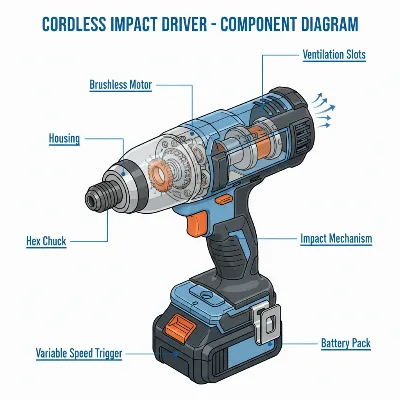 Detailed diagram of an impact driver showing its main components for maintenance
Common Types of Impact Drivers
The market offers various impact drivers, primarily categorized by their power source. Understanding these types is crucial for both selection and maintenance, as each has distinct characteristics.
Cordless Impact Drivers (Battery-Powered)
Cordless impact drivers are by far the most popular type due to their unparalleled portability and convenience. Powered by rechargeable lithium-ion batteries, they offer freedom of movement, making them ideal for job sites without readily available power outlets or for tasks requiring frequent repositioning. They come in various voltage ratings, typically 12V, 18V, and 20V (Max), with higher voltages generally indicating more power and longer runtimes.
- Advantages: Exceptional portability, no need for power outlets, versatile for various applications, generally quieter than pneumatic.
- Disadvantages: Battery run-time limitations, batteries degrade over time, higher initial cost than corded alternatives, can be heavier due to battery.
- Applications: General construction, woodworking, automotive repairs, DIY projects, electrical work.
Pneumatic Impact Drivers (Air-Powered)
Pneumatic impact drivers operate using compressed air, requiring an air compressor to function. These tools are often favored in industrial settings, automotive workshops, and heavy-duty applications where consistent, high torque is needed for extended periods. They are known for their raw power and durability.
- Advantages: Extremely powerful, lighter weight (no battery), highly durable, less prone to overheating, generally more affordable upfront.
- Disadvantages: Requires an air compressor and hose, limited by hose length, can be noisy, requires regular oiling of the air motor.
- Applications: Automotive mechanics, heavy machinery assembly, industrial construction, tire shops.
Comparing Cordless and Pneumatic Impact Drivers
| Feature | Cordless Impact Driver | Pneumatic Impact Driver |
|---|---|---|
| Power Source | Rechargeable Lithium-ion Battery | Compressed Air |
| Portability | High (no cords/hoses) | Limited by air hose length |
| Power Output | Excellent for most tasks, improving with technology | Very High, consistent for heavy-duty applications |
| Weight | Heavier due to battery pack | Lighter (tool itself) |
| Noise Level | Moderate | High |
| Maintenance | Battery care, general cleaning, chuck lubrication | Air motor oiling, air line maintenance, general cleaning |
| Initial Cost | Can be higher (tool + batteries + charger) | Lower (tool only, compressor is separate cost) |
| Operating Cost | Battery replacement over time, electricity for charging | Electricity for compressor, air tool oil |
Key Factors to Consider When Choosing an Impact Driver
Selecting the right impact driver involves more than just picking the first one you see. Several critical factors influence a tool’s performance and suitability for your specific needs.
Torque – The Most Crucial Factor
Torque, measured in inch-pounds (in-lbs), foot-pounds (ft-lbs), or Newton-meters (Nm), is the rotational force an impact driver can exert. It’s arguably the most critical specification, directly indicating the tool’s ability to drive or remove stubborn fasteners. Higher torque values mean the driver can handle larger, longer screws and tougher materials with less effort.
- Light-duty (1,000-1,500 in-lbs / 113-170 Nm): Ideal for smaller tasks, furniture assembly, and driving short screws into softer woods.
- Medium-duty (1,500-2,000 in-lbs / 170-226 Nm): Suitable for most common construction and renovation projects, deck building, and general fastening.
- Heavy-duty (2,000+ in-lbs / 226+ Nm): Necessary for driving very large lag bolts, working with dense hardwoods, or automotive applications.Consider the types of fasteners and materials you’ll frequently encounter to determine the appropriate torque range.
No-Load Speed and Impact Rate
- No-Load Speed (RPM): This refers to the maximum rotational speed of the chuck when the tool is running without any load. Higher RPMs translate to faster driving of fasteners, which can save time on repetitive tasks. Most impact drivers offer variable speed triggers, allowing you to control the RPM based on the application.
- Impact Rate (IPM – Impacts Per Minute): This measures how many times the internal hammer strikes the anvil per minute. A higher IPM indicates that the tool delivers more impactful blows, which can be beneficial for breaking loose rusted fasteners or driving into very tough materials. Combined with high torque, a high IPM signifies a powerful and efficient tool.
Battery Type and Runtime (For Cordless Models)
For cordless impact drivers, the battery system is paramount.
- Battery Voltage: As mentioned, higher voltage (e.g., 18V, 20V MAX) generally means more power and sustained performance.
- Amp-Hours (Ah): This specification indicates the battery’s capacity and directly affects runtime. A 5.0 Ah battery will typically provide twice the runtime of a 2.5 Ah battery on the same tool.
- Battery Chemistry: Lithium-ion (Li-ion) is the standard due to its high energy density, lighter weight, and minimal “memory effect.”
- Charging Time: Consider how quickly the battery recharges, especially if you plan to use the tool for extended periods and need multiple batteries in rotation.Proper battery care is essential for maximizing their lifespan and performance.
Size and Weight
An impact driver’s physical characteristics greatly influence user comfort and maneuverability.
- Compactness: Smaller, lighter models are ideal for working in tight spaces, overhead tasks, or when extended use is required to minimize fatigue.
- Ergonomics: A comfortable grip and balanced design reduce strain during operation. Try holding different models to see how they feel in your hand.While powerful tools tend to be larger and heavier, advancements in brushless motor technology are leading to more compact and powerful designs.
Brand and Price
- Reputation: Established brands like DeWalt, Makita, Milwaukee, Bosch, and Ryobi are known for reliability, performance, and customer support. Investing in a reputable brand often means better build quality and easier access to replacement parts or service.
- Price: Impact drivers range from entry-level options for casual DIYers to high-end professional models. Set a budget, but remember that a cheaper tool might cost more in the long run due to frequent repairs or early replacement. Balance features, power, and brand reputation within your price range.
Essential Maintenance Tips for Your Impact Driver
Regular maintenance is the cornerstone of extending your impact driver’s life and ensuring it performs optimally. Simple routines can prevent common issues and keep your tool working like new.
1. Daily Cleaning After Each Use
Dirt, dust, and debris are the enemies of any power tool. A quick clean after every use can prevent buildup from affecting performance.
- Wipe Down: Use a clean, dry cloth to wipe down the exterior of the tool, removing grease, oil, dust, and grime. Avoid harsh, abrasive cleaners or solvents like gasoline or acetone, as these can damage the plastic housing. Mild soap and a damp cloth are usually sufficient.
- Clear Vents: Use compressed air (at low pressure) or a soft brush to clear dust and debris from the motor vents. Ensure you don’t blow debris further into the tool. Clear vents prevent overheating, which can severely damage the motor.
- Chuck Area: Pay special attention to the quick-release chuck. Debris here can hinder bit changes and affect bit retention. A small brush can help remove particles.
2. Proper Lubrication
Lubrication is vital for the internal moving parts of your impact driver, particularly the impact mechanism and chuck.
- Chuck Lubrication: Periodically apply a small amount of dry lubricant (like PTFE spray or silicone spray) to the chuck mechanism. This ensures smooth bit insertion and release. Avoid heavy grease, which can attract dust.
- Internal Mechanism: For pneumatic impact drivers, regular oiling of the air motor is essential. Follow your manufacturer’s recommendations for the type and frequency of air tool oil. Cordless impact drivers generally have sealed impact mechanisms that do not require user-level lubrication; attempting to open them may void your warranty.
3. Battery and Charger Care (For Cordless Impact Drivers)
Batteries are the heart of cordless tools, and their care directly impacts runtime and lifespan.
- Optimal Charging: Use only the charger designed for your battery. Charge batteries fully after each use and avoid frequently running them to zero charge. However, some manufacturers suggest allowing a complete discharge periodically to recalibrate the battery’s fuel gauge.
- Storage: Store batteries in a cool, dry place, away from extreme temperatures (heat or freezing cold) and direct sunlight. Disconnect the battery from the tool before long-term storage to prevent accidental discharge or tool activation. If storing for extended periods (months), many manufacturers recommend storing lithium-ion batteries at a 40-50% charge level, rather than full or empty, to maximize lifespan.
- Inspection: Regularly inspect batteries for any signs of damage, such as cracks, leaks, or overheating. Replace damaged batteries immediately. Keep battery terminals clean and free of debris.
4. Regular Inspection for Wear and Damage
A proactive approach to inspection can catch small issues before they become major problems.
- Housing and Casing: Check for cracks, loose fasteners, or damage to the tool’s housing. Tighten any loose screws.
- Chuck and Anvil: Inspect the chuck for excessive wear or damage that might affect bit retention. For impact wrenches, regularly check the anvil for wear or damage that could compromise socket fit. Replace worn components if necessary.
- Cords and Hoses (if applicable): For corded tools or pneumatic tools, inspect power cords and air hoses for cuts, fraying, or leaks.
- Brushes (for older brushed motors): If your impact driver has a brushed motor (less common in newer models which often feature brushless technology), regularly check the carbon brushes for wear and replace them before they wear out completely to prevent motor damage.
5. Proper Storage
Correct storage protects your investment from environmental damage and accidental impact.
- Clean and Dry: Always store your impact driver in a clean, dry place, free from moisture and dust.
- Protective Case: Use the original carrying case or a dedicated toolbox to protect the tool from physical damage and keep it organized.
- Battery Removal: For cordless models, always remove the battery from the tool before storing it, especially in a toolbox where it could accidentally activate.
- Away from Elements: Avoid storing tools in extreme temperatures or direct sunlight.
> “Consistent care, even seemingly minor steps like a quick wipe-down or proper battery storage, significantly extends the life and reliability of your impact driver. It’s an investment in your productivity.” – Alex Chen, Lead Technician at ReviewedJobs.com
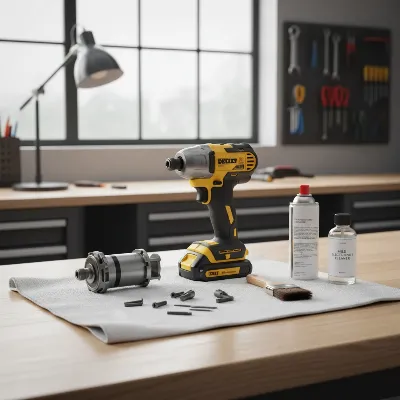 A well-organized workbench with an impact driver being cleaned, showing cleaning supplies.
Buying Guide: Expert Advice from ReviewedJobs.com
Choosing the right impact driver can be daunting with so many options available. Here’s our expert advice to guide your decision:
Determine Your Usage Needs
The first step is to honestly assess how you’ll primarily use the impact driver.
- Occasional DIYer: If you only need it for light household tasks or occasional projects, a 12V or 18V entry-level cordless model with moderate torque will suffice. You might prioritize compactness and ease of use.
- Serious DIYer/Weekend Warrior: For more frequent, varied projects like deck building, fencing, or furniture assembly, an 18V/20V system from a reputable brand offering a good balance of power, runtime, and features is ideal. Look for models with higher torque and IPM.
- Professional/Tradesperson: If you use an impact driver daily for demanding tasks, invest in a high-performance 18V/20V (or pneumatic) model from a professional-grade brand (e.g., DeWalt, Milwaukee, Makita). Prioritize durability, maximum torque, and extended battery life. Consider tool-only options if you already own batteries from the same platform.
Set a Suitable Budget
Power tools are an investment. While it’s tempting to go for the cheapest option, remember that quality often correlates with longevity and performance.
- Entry-level: Expect to pay $80-$150 for a basic cordless kit (tool, battery, charger).
- Mid-range: $150-$250 will get you a more robust 18V/20V kit with better features and more power.
- Professional-grade: $250-$400+ for high-end brushless models with advanced features, higher torque, and possibly larger capacity batteries.Factor in the cost of extra batteries and impact-rated accessories (bits, sockets) when setting your budget.
Read Specifications and User Reviews Carefully
Don’t just rely on marketing claims. Dive into the technical specifications and listen to other users.
- Specifications: Pay close attention to torque (in-lbs/Nm), no-load speed (RPM), and impact rate (IPM). Compare these across different models relevant to your needs. For cordless, check battery voltage and Ah.
- User Reviews: Real-world feedback is invaluable. Look for reviews that discuss:
- Performance: Does it have enough power for tough jobs?
- Durability: How well does it hold up to regular use?
- Ergonomics: Is it comfortable to hold and use for extended periods?
- Battery Life: How long does the battery last under load, and how quickly does it charge?
- Reliability: Are there common issues or complaints?Check multiple sources for reviews, including professional tool testing sites and large retailers.
Purchase from Reputable Retailers
Buying from trusted sources ensures you receive genuine products, proper warranties, and reliable customer service.
- Authorized Dealers: Purchase from authorized dealers or major hardware stores. This protects you from counterfeit products and ensures you can utilize the manufacturer’s warranty if needed.
- Online Marketplaces: If buying online, choose reputable sellers with strong return policies. Be wary of deals that seem too good to be true, as they often are.A reliable retailer will also be able to offer advice and support, guiding you to the best choice for your needs.
Conclusion
An impact driver is a powerful ally in any toolkit, transforming challenging fastening tasks into manageable ones. By adhering to a routine of regular cleaning, appropriate lubrication, meticulous battery care, and diligent inspection, you can significantly extend your tool’s operational life and maintain its peak performance. Remember, a well-maintained impact driver not only saves you money on repairs and replacements but also enhances safety and efficiency on every project. What steps will you take today to ensure your impact driver is ready for the next challenge?
Frequently Asked Questions
How often should I clean my impact driver?
You should ideally perform a basic wipe-down and clear the vents of your impact driver after every use, especially after working in dusty or dirty environments. A more thorough cleaning can be done monthly or as needed.
Can I use any lubricant on my impact driver’s chuck?
No, it’s best to use a dry lubricant like a PTFE or silicone spray specifically designed for tools. Avoid heavy greases or oil-based lubricants as they can attract dust and debris, leading to clogs and decreased performance.
What’s the best way to store impact driver batteries?
Store lithium-ion batteries in a cool, dry place away from direct sunlight and extreme temperatures. For long-term storage, a charge level of around 40-50% is often recommended by manufacturers to maximize battery lifespan. Always remove the battery from the tool when storing.
How do I know if my impact driver’s brushes (if applicable) need replacing?
Signs of worn carbon brushes include intermittent power, decreased performance, excessive sparking from the motor, or the tool stopping completely. If your impact driver has a brushed motor, check the brushes regularly and replace them when they are worn down to about a quarter of their original length.
Is it okay to use an impact driver in wet conditions?
It is generally not recommended to use electric impact drivers in wet conditions as moisture can damage the internal electronics and pose a shock hazard. If the tool gets wet, disconnect the battery immediately and allow it to dry thoroughly before attempting to use it again.
Frequently Asked Questions
How often should I clean my impact driver?
You should ideally perform a basic wipe-down and clear the vents of your impact driver after every use, especially after working in dusty or dirty environments. A more thorough cleaning can be done monthly or as needed to prevent buildup from affecting performance.
Can I use any lubricant on my impact driver's chuck?
No, it's best to use a dry lubricant like a PTFE or silicone spray specifically designed for tools. Avoid heavy greases or oil-based lubricants as they can attract dust and debris, leading to clogs and decreased performance in the chuck mechanism.
What's the best way to store impact driver batteries?
Store lithium-ion batteries in a cool, dry place away from direct sunlight and extreme temperatures. For long-term storage, a charge level of around 40-50% is often recommended by manufacturers to maximize battery lifespan. Always remove the battery from the tool when storing.
How do I know if my impact driver's brushes need replacing?
Signs of worn carbon brushes include intermittent power, decreased performance, excessive sparking from the motor, or the tool stopping completely. If your impact driver has a brushed motor, check the brushes regularly and replace them when they are worn down to about a quarter of their original length.
Is it okay to use an impact driver in wet conditions?
It is generally not recommended to use electric impact drivers in wet conditions as moisture can damage the internal electronics and pose a shock hazard. If the tool gets wet, disconnect the battery immediately and allow it to dry thoroughly before attempting to use it again.
Maintain Your Impact Driver for Extended Life
Follow these essential steps to ensure your impact driver remains in optimal condition, preventing premature wear and costly replacements.
Wipe down the exterior of your impact driver with a clean, dry cloth to remove grease, oil, and dust. Use compressed air or a soft brush to clear debris from motor vents and the quick-release chuck area to prevent overheating and ensure smooth bit changes.
Periodically apply a small amount of dry lubricant, such as PTFE or silicone spray, to the chuck mechanism for smooth bit insertion and release. For pneumatic impact drivers, regularly oil the air motor according to manufacturer guidelines; cordless models typically have sealed mechanisms.
Always use the correct charger and fully charge batteries after each use, avoiding frequent deep discharges. Store lithium-ion batteries in a cool, dry place, ideally at a 40-50% charge level for long-term storage, and always remove them from the tool when not in use.
Inspect the tool's housing for cracks or loose fasteners, and check the chuck for excessive wear that could affect bit retention. For older brushed motors, regularly check carbon brushes and replace them when they are worn down to about a quarter of their original length to prevent motor damage.
Store your impact driver in a clean, dry place, preferably in its original carrying case or a dedicated toolbox, to protect it from physical damage and environmental factors. Always remove the battery from cordless models before storing to prevent accidental activation.

I’ve always been pretty good about cleaning my tools, but the tip about checking the carbon brushes regularly was a game-changer for me. I never really thought about how much wear they get, especially with how often I use my DeWalt for deck projects. Swapped them out last week and it feels like new again. Definitely worth the few minutes it takes.
Great advice on keeping these tools running. I’ve had my Ryobi impact driver for about three years now and it’s been a workhorse. I’m usually good about keeping it clean, but I hadn’t considered lubricating the anvil and hammer mechanism. After reading this, I gave it a shot and it definitely feels smoother. Wish I’d known this sooner!
The info on battery care was helpful, especially about not letting them fully discharge. I’ve been guilty of that with my Milwaukee M18 batteries. My only minor complaint is that I wish there was a bit more detail on specific lubricants to use for different brands. It’s a bit vague on that front, but overall, solid tips.
This guide is spot on. I’ve been doing DIY for years and always just assumed my impact driver would last forever if I didn’t abuse it. The part about inspecting the chuck for wear and tear really hit home. Mine was starting to get a bit wobbly, and a quick check showed some significant wear. Replaced it and it’s back to driving screws like a champ.